
 By
·
12 minute read
By
·
12 minute read
VTP (VLAN Trunking Protocol) is Cisco's proprietary Layer 2 protocol that propagates VLAN database changes across switches inside the same VTP domain over trunk links. It runs in one of three modes (server, client, or transparent), in one of three versions (v1, v2, or v3, with v3 introduced in 2008 and adding primary-server protection), and uses a 32-bit revision number that starts at 0 and increments on every VLAN change. The highest revision number wins, which is exactly why the protocol is famous for catastrophic outages.
You've probably heard the VTP horror stories. Someone connects a decommissioned switch "just to grab some configs," that switch had VTP server mode enabled and a higher revision number from a previous life, and within 90 seconds every switch in the production VTP domain has synchronized to a completely empty VLAN database. Phones stop working. Printers vanish. Finance can't reach the ERP. (Somehow these things never happen at 10 AM on a Monday. Networking has a sense of timing.)
That's VTP (VLAN Trunking Protocol) in a nutshell: incredibly useful when it works, catastrophic when it doesn't. The protocol propagates VLAN configurations automatically across your switches based on revision numbers, with no "are you sure?" prompt and no concept of whether the higher revision represents the configuration you actually want.
Spanning-tree protocols quietly converge in the background. VTP is loud: it actively rewrites your switch configurations based on what it learns from neighbors, and if you don't understand exactly how it decides what to overwrite, it will eventually hurt you. Testing it in a lab where you can safely break things is the only honest way to learn it.
EVE-NG solves half that problem by letting you build enterprise-grade network labs in software. CloudMyLab solves the other half by hosting those labs so you don't have to hear your cooling fans scream.
CloudmyLab is EVE-NG's official and only cloud partner.
Here's how to validate VTP behavior, mode differences, synchronization, and the classic revision number disaster, using a ready-made network topology from EVE-NG's Lab Library, hosted where it belongs: in the cloud.
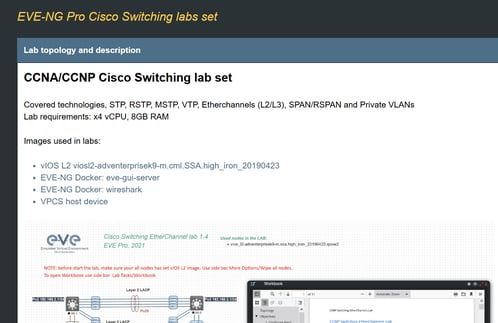
Table of contents:
- What this lab demonstrates
- Topology overview
- Configuration workflow
- Why hosted matters for VTP testing
- Who needs this lab
- See it running
What this lab demonstrates
Lab 1-3 from EVE-NG's Switching series focuses entirely on VTP behavior across modes, versions, and failure scenarios. You'll configure VTP domains, watch synchronization between server and client switches, and (most importantly) observe what happens when things go wrong, so you recognize the symptoms in production before they become 3 AM phone calls.
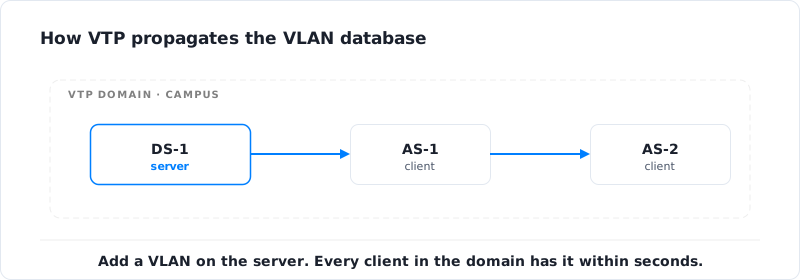
Here's what you're actually testing:
- Modes (Server/Client/Transparent): How each mode behaves and why "transparent" has become the default for most engineers with more than five years of war stories.
- Domain configuration: How switches decide whether they're in the same domain, and why connecting a switch with no domain (or a different one) creates behavior that makes you doubt your understanding of basic networking.
- Revision number mechanics: Higher revision number always wins, even if that revision represents a completely empty VLAN database from a switch you decommissioned in 2019. (This is the number one cause of related outages. The protocol doesn't care about intent; it cares about mathematics.)
- Version differences (v1/v2/v3): Why v3's primary server concept finally made the protocol usable in production environments where v1 and v2 were operationally dangerous.
- Synchronization behavior: What happens when you add a new switch to an existing domain, and how to prevent that new switch from overwriting your production VLAN database.
- Pruning: Reducing unnecessary VLAN traffic on trunk links, which sounds great until it prunes a VLAN you actually needed.
Teams run this lab before migrations, after inheriting a network with VTP enabled, or before connecting any new switch to a production domain. Because once that revision number is wrong, the time between "I'm just plugging this in" and "the entire finance department can't access anything" is measured in seconds.
VTP server, client, and transparent modes at a glance
Before you start configuring anything, here is how the three VTP modes behave on the dimensions that decide whether your VLAN database survives the day:
| Mode | Can change VLANs locally | Forwards advertisements | Stores VLAN config | Default in IOS 15+ | Use case |
|---|---|---|---|---|---|
| Server | Yes (full read/write) | Yes | vlan.dat (NVRAM) | No | Central VLAN authority in a controlled domain |
| Client | No (rejects local edits) | Yes | Synced from server (RAM only in v1/v2) | No | Access switches receiving the database from a server |
| Transparent | Yes (local only) | Yes (relays only, ignores them) | vlan.dat + running-config | Yes (since IOS 15.x) | Most modern deployments — opt out of automatic sync |
VTP v1 and v2 cap the database at 1005 VLANs and only sync the standard range (1-1005); VTP v3 extends sync to the full extended range (1-4094) and adds the primary server mechanic introduced in 2008, which is the only reason the protocol is safe to run in server/client mode in production.
If you are inheriting a campus network with VTP enabled, or planning a migration to v3, you need a safe place to validate mode changes and revision-number behavior before touching production. CloudMyLab's hosted EVE-NG gives teams a pre-built distribution/access topology with snapshot/revert, so you can trigger the classic disaster scenarios on purpose, recover, and document the runbook without ever risking a real VLAN database.
Topology overview
The topology for Lab 1-3 builds on the distribution/access design from Labs 1-1 and 1-2 but focuses on VLAN propagation across the switching domain. It comes from EVE-NG's Lab Library, so you're not designing it from scratch.
Core components:
- DS-1: Distribution switch typically configured as VTP server (Cisco IOSvL2)
- DS-2: Distribution switch you'll cycle through server, client, and transparent modes for testing
- AS-1 and AS-2: Access switches as VTP clients receiving the VLAN database from the server
- Optional "decommissioned" switch: A spare with an artificially inflated revision number to simulate the classic VTP disaster scenario (because you'd rather discover this in a lab than during a maintenance window)
Key configuration elements:
- Domain name: Must match exactly across all participating switches (case-sensitive, like everything else in networking)
- Mode: Server, client, or transparent on each switch
- Version: v2 in most labs, v3 if you want to see how the protocol becomes actually safe
- Password: Optional authentication that prevents unauthorized switches from joining the domain
- Revision number: Starts at 0, increments with every VLAN change. This is your primary troubleshooting metric.
Topology adapted from the EVE-NG Lab Library.
The design intentionally creates conditions where synchronization can go wrong. You'll watch what happens when a client connects to a server, when modes change mid-flight, and when revision numbers conflict. The only way to truly understand the protocol is to break it under controlled conditions and rebuild from there.
Configuration workflow
This workflow assumes you understand basic VLAN configuration and trunk setup from the previous labs. The focus here is entirely on protocol behavior, synchronization, and failure modes. Plan for 60-90 minutes if you're using CloudMyLab's hosted EVE-NG; longer if you're fighting your laptop for resources.
Configure the initial VTP domain
Start by setting up DS-1 as your VTP server with a baseline VLAN database:
! On DS-1:
vtp mode server
vtp domain CAMPUS
vtp version 2
vtp password SecureVTP

vlan 10
 name Engineering
vlan 20
 name Finance
vlan 30
 name HR
Run show vtp status and note the revision number (it should be 3 after creating three VLANs) and the VTP mode. The configuration digest in that output is a hash of your VLAN database, which you'll use later to verify synchronization. Confirm VLANs exist with show vlan brief. This is your "known good" configuration.
Add VTP clients
On the access switches, configure them as VTP clients in the same domain:
! On AS-1 and AS-2:
vtp mode client
vtp domain CAMPUS
vtp password SecureVTP
Within a few seconds (assuming trunks are configured correctly), AS-1 and AS-2 should pull the VLAN database from DS-1 automatically. Run show vlan brief on each access switch and confirm VLANs 10, 20, and 30 appeared. If they didn't, your trunks aren't actually trunking. Advertisements travel only over trunk links, and there's no point chasing protocol issues until that's solid.
Compare show vtp status across switches. The revision number should match everywhere.
Test VLAN propagation
On DS-1, add a new VLAN:
vlan 40
 name Marketing
Within 5-10 seconds, run show vlan brief on AS-1. VLAN 40 should appear without you touching that switch. The revision number on every switch should bump to 4. This is the protocol working correctly: one config change on the server, automatically propagated to every client. For a campus with 50+ switches, this beats SSHing into every device and typing the same VLAN command 50 times.
The problem (and the entire reason for the next two steps) is that this same mechanism propagates wrong, accidental, or destructive changes with the same speed and efficiency.
Test transparent mode
Configure DS-2 in transparent mode:
! On DS-2:
vtp mode transparent
Transparent mode means DS-2 maintains its own local VLAN database, ignores advertisements from the domain, but still forwards them to other switches (acting as a relay). Create a local VLAN on DS-2:
vlan 50
 name Test_VLAN
Check the other switches. VLAN 50 should not appear on DS-1, AS-1, or AS-2 because transparent mode doesn't participate in synchronization. This is why transparent mode is so popular: you get manual VLAN control on a specific switch without breaking the protocol for everyone else.
Trigger the revision number disaster
This is the scenario that justifies running this lab at all. You're going to simulate connecting a decommissioned switch with a higher revision number, the classic failure mode that has caused more VTP outages than any other single misconfiguration.
On a spare switch, configure it as a server in the same domain and inflate the revision number by creating and deleting VLANs:
! On the "old" switch:
vtp mode server
vtp domain CAMPUS
vtp password SecureVTP

vlan 100
no vlan 100
vlan 101
no vlan 101
vlan 102
no vlan 102
! Repeat until revision is higher than production
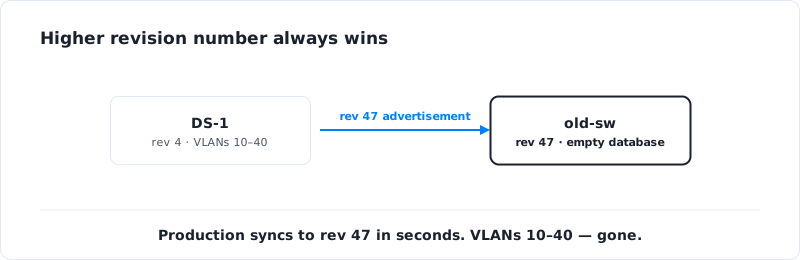
Confirm with show vtp status that this switch's revision number is higher than your production switches (e.g., 15 vs. 4). Now connect this switch to your production network via a trunk link.
Within seconds, every switch in the domain receives the new advertisements, compares revision numbers, decides the new switch has the authoritative database, and synchronizes to it. Run show vlan brief on DS-1, AS-1, and AS-2. Your VLANs are gone or replaced with whatever was in the "old" switch's database, which in this case is essentially empty.
In production, this is the moment phones fail, printers disappear, and people walk to the network team's desk asking what's wrong. In the lab, this is the moment you understand viscerally why the protocol is dangerous when misconfigured.
How to recover:
- Disconnect the rogue switch immediately, physically unplug it, don't waste time with
shutdowncommands - On DS-1, reconfigure all VLANs from your baseline (this is why VLAN documentation matters)
- Wait for synchronization to propagate to all client switches
- Verify with
show vlan briefacross the domain - Update your runbooks: never connect a switch to an existing domain without resetting its revision to 0 first
The reset trick is simple, change the domain name to something else, then change it back:
vtp domain TEMPORARY
vtp domain CAMPUS
This zeroes the revision number, ensuring the new switch will receive the database from production servers instead of overwriting it. Tattoo it on your forearm. (Half joking.)
Optionally test version 3
If your IOSvL2 image supports VTP v3 (most do, since v3 has been around since 2008), enable it and configure a primary server:
vtp version 3
vtp primary
Version 3 introduces the primary server concept: only the designated primary can make VLAN database changes, which fundamentally prevents the disaster you just triggered in the previous step. A switch with a higher revision number can no longer overwrite production because it isn't authorized to write at all. Test failover behavior, then document how primary server election works when the primary goes offline.
If you're deploying VTP in production for legitimate reasons, v3 should be your default. The primary server feature alone justifies the migration from v2.
Why hosted matters for VTP testing
Testing this protocol requires multiple switches, working trunk links, and the ability to safely create disaster scenarios without affecting anything real. Doing it locally means either investing in hardware or running enough virtual switches to make your laptop visibly suffer.
CloudMyLab's hosted EVE-NG removes that friction (see Lab 1-1 for the full breakdown of hosted benefits, zero local setup, multi-user sessions, and snapshot/revert).
For this lab specifically, hosted environments matter because:
You can break things safely: Want to see what happens when a switch with revision 47 connects to your production domain? Snapshot first, run the test, watch the disaster, revert in 30 seconds, try again with the recovery procedure.
Testing at realistic scale is practical: Behavior gets more complex with more switches and more VLANs. Spinning up 8-10 switches just to see how fast advertisements propagate isn't realistic locally; it's trivial in hosted.
Team training is dramatically easier: These failures are best understood experientially. Watching someone trigger the classic revision number disaster live, while the whole team works through recovery together, beats any PowerPoint about why the protocol is dangerous.
Who needs this lab
VTP is controversial in the networking community, and by "controversial" I mean it generates the kind of debates that derail Reddit threads for 200 comments. Some engineers swear by it for networks with frequent VLAN changes. Others refuse to enable it under any circumstance. A third group runs everything in transparent mode and calls it "using VTP" even though they've disabled the features that make VTP interesting.
- Campus network teams managing multiple buildings or distribution blocks (especially in education, healthcare, or large enterprise environments) often run VTP because manually propagating VLAN changes to 80+ switches is genuinely painful. This lab validates your domain design, tests recovery procedures, and proves your team knows how to reset revision numbers before connecting new switches.
- Engineers inheriting an existing deployment ("congratulations on your new job, here's a network someone else configured") need to assess what they've inherited before making any changes. If
show vtp statusshows v1 across 80 switches with no password, you're sitting on a time bomb. This lab helps you plan a migration to v3 with proper controls, or to transparent mode across the board. - CCNA and CCNP candidates see this protocol on both exams, but exam questions don't capture the operational reality. The exam tests whether you can configure modes and explain revision numbers; the lab tests whether you understand why connecting a decommissioned switch can be catastrophic and how to prevent it.
- Anyone whose policy is "we don't use VTP" should still run this lab. Even with all switches in transparent mode, advertisements still flow across your trunks. If someone accidentally puts a switch into server or client mode, you're back in the danger zone. Understanding the protocol's behavior matters even when you're not actively using it.
- MSPs and consultants who work across multiple client networks encounter setups ranging from "expertly managed" to "time bomb." This lab gives you a reference environment for assessing client deployments and developing standardized approaches for managing or migrating away from the protocol.
See it running
Want to understand VTP, including the classic disaster scenarios, before you encounter them in production?
We'll provision Lab 1-3 from EVE-NG's Lab Library with your specific requirements. You'll configure servers and clients, test propagation, run the revision number disaster, and practice the recovery procedure in a safe environment where "I just wiped out all the VLANs" is a learning moment instead of a resume-generating event.
You'll see exactly what show vtp status looks like when synchronization works, when revision numbers conflict, and when switches are misconfigured. You'll practice recovery before you need it at 3 AM.
No hardware required. No risk to production. Just full protocol testing with snapshot/revert so you can run destructive tests without consequences.
Frequently asked questions
What is VTP (VLAN Trunking Protocol)?
VTP (VLAN Trunking Protocol) is Cisco's proprietary Layer 2 protocol that propagates VLAN database changes across switches inside the same VTP domain over trunk links. It runs in three modes (server, client, transparent), three versions (v1, v2, v3), and uses a 32-bit revision number that starts at 0 and increments on every VLAN change. The highest revision number always wins, which is why misconfigured VTP is a common cause of campus-wide outages.
What is the difference between VTP server, client, and transparent modes?
A VTP server can create, modify, and delete VLANs and propagates changes to the rest of the domain. A VTP client cannot make local VLAN changes; it accepts the database from servers and forwards advertisements. A VTP transparent switch maintains its own local VLAN database, ignores incoming advertisements, but still forwards them to other switches. Transparent is the default in Cisco IOS 15.x and the safest choice for most modern deployments.
What is the VTP revision number?
The VTP revision number is a 32-bit counter that starts at 0 and increments by 1 every time a VLAN is added, modified, or deleted on a server in the domain. When a switch receives an advertisement with a higher revision number than its own, it overwrites its local VLAN database to match. This is the mechanism that makes VTP useful for legitimate change propagation and dangerous when an old switch with an inflated revision number reconnects to a production domain.
Why is VTP dangerous in production networks?
VTP server and client modes accept any advertisement from a switch in the same domain that has a higher revision number, with no confirmation, no rollback, and no concept of which database is the "right" one. A decommissioned switch with revision 47 connected to a production domain at revision 4 will overwrite every VLAN on every switch within seconds. There is no protocol-level safeguard in v1 or v2; only VTP v3's primary-server mechanic prevents it.
What is the difference between VTP v1, v2, and v3?
VTP v1 is the original implementation with limited features. VTP v2 adds Token Ring support, version-dependent transparent mode, and consistency checks. VTP v3 (introduced in 2008) is the major upgrade: it adds the primary-server mechanic so only one designated switch can write to the database, supports the extended VLAN range (1-4094) and Private VLANs, and adds optional MD5 authentication. If you are running VTP in production for legitimate reasons, v3 is the only version that should be on the table.
How do I reset the VTP revision number on a switch?
Change the VTP domain name to a different value, then change it back to the original. The mode is fine to leave alone. The revision counter resets to 0 because the switch treats the rename as joining a new domain. Run show vtp status to confirm. This reset must be done on any switch before it is connected to an existing VTP domain — otherwise it can overwrite production VLANs if its revision number is higher.
What is VTP pruning?
VTP pruning is an optional feature that removes a VLAN's traffic from a trunk link if no downstream switches have ports in that VLAN. It reduces unnecessary broadcast and multicast traffic on trunks. Pruning is configured globally on a server with vtp pruning and applies across the domain. It works well in stable networks but can prune a VLAN you actually needed if your topology changes and the protocol has not reconverged.
Is VTP backward compatible across versions?
VTP v1 and v2 are interoperable on a per-domain basis: enabling v2 on a server propagates the version change to clients automatically. VTP v3 is not backward compatible by default; v3 switches send v3 advertisements that v1/v2 switches ignore, although v3 can fall back to v2 mode on specific trunks. For migrations, you typically run v2 across the domain first, then upgrade switches to v3 with primary-server protection enabled before changing the version domain-wide.
