
 By
·
10 minute read
By
·
10 minute read
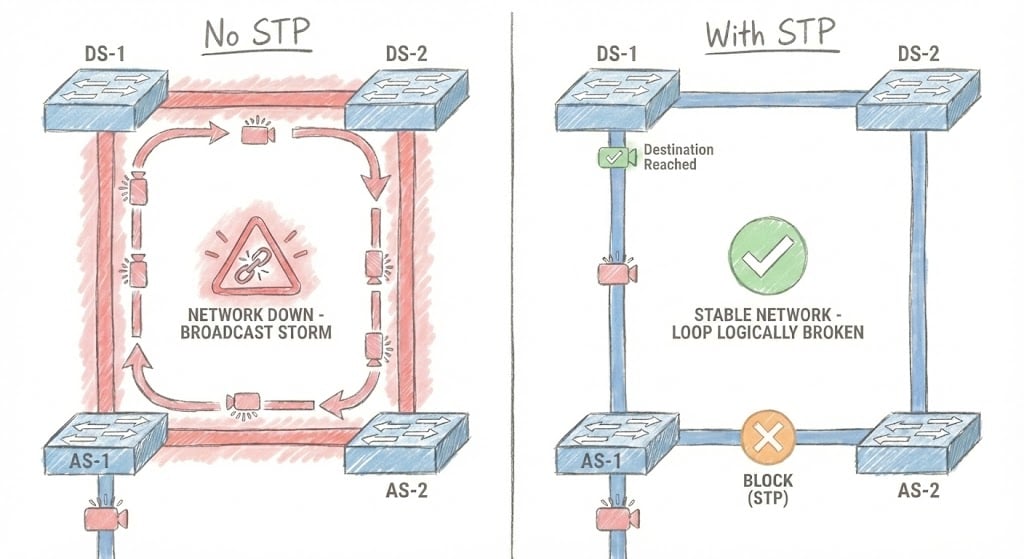
STP (Spanning Tree Protocol, IEEE 802.1D) and its rapid successor RSTP (IEEE 802.1w) prevent Layer 2 loops by electing a single root bridge and selectively blocking redundant ports. Classic STP converges in 30-50 seconds across five port states (disabled, blocking, listening, learning, forwarding). RSTP cuts that to sub-second failover using just three states (discarding, learning, forwarding) and a proactive BPDU model. Both share the same default bridge priority of 32768 and a 2-second hello timer, but only RSTP is fast enough for modern networks.
I've seen more network outages caused by Layer 2 loops than I care to admit. There's something uniquely humbling about watching a perfectly stable topology spiral into broadcast chaos because someone plugged in a cable they shouldn't have and realizing you're that someone. (It was a Friday afternoon. I should have known better.) That's why running STP and RSTP labs before touching production is a career preservation.
The problem is, spinning up a proper switching topology with distribution and access layers requires either a home lab that sounds like a small aircraft taking off or wrestling with local VM resources that weren't really designed for running four IOSvL2 instances simultaneously. Your laptop will have opinions about this, and those opinions won't be positive.
EVE-NG solves half that problem by letting you build enterprise-grade network labs in software. CloudMyLab solves the other half by hosting those labs so you don't have to hear your cooling fans scream.
CloudmyLab is EVE-NG's official and only cloud partner.
Here's how to validate spanning tree behavior root election, convergence times, etc, using a ready-made network topology from EVE-NG's Lab Library, hosted where it belongs: in the cloud.
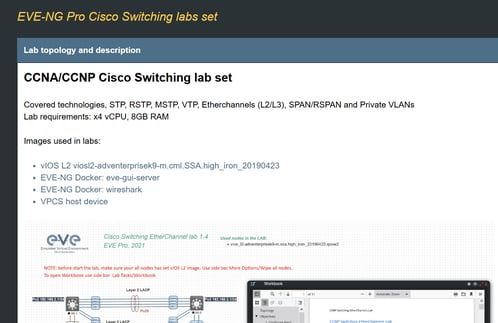
Table of contents:
- What this lab demonstrates
- Topology overview
- Configuration workflow
- Why hosted EVE-NG matters
- Who benefits from this lab
- See it running
What this lab demonstrates
Lab 1-1 from EVE-NG's Switching series walks you through classic 802.1D STP behavior and then lets you compare it directly with 802.1w RSTP. You'll watch root bridge election in action, observe port roles and states as they transition, and most importantly, measure the convergence delta between STP and RSTP when you intentionally break things. (And you will be breaking things. That's the whole point.)
Here's what you're actually testing:
- Root bridge election: How priority and MAC address tie-breaks determine which switch becomes root (spoiler: lowest priority wins, and if there's a tie, lowest MAC takes it).
- Port roles and states: The difference between root, designated, and alternate ports, plus how they move through forwarding, learning, and discarding states. If you learned this as blocking/listening/learning/forwarding, congratulations on being old enough to remember pre-RSTP terminology.
- Convergence behavior: The time it takes for the topology to stabilize after a link failure or restoration (where "stabilize" means "stop flooding broadcasts everywhere")
Teams typically run this lab before change windows to verify their design assumptions (things like "DS-1 is definitely the root bridge" and "we'll recover from an uplink failure in under 10 seconds"). You'd be surprised how often those assumptions don't hold up when you actually test them.
STP vs RSTP vs MSTP at a glance
Before configuring anything, here is how the three IEEE spanning-tree variants compare on the dimensions that matter operationally:
| Protocol | Standard | Convergence | Port states | BPDU model | Best for |
|---|---|---|---|---|---|
| STP | IEEE 802.1D | 30-50 sec | 5 (disabled, blocking, listening, learning, forwarding) | Root bridge originates; relayed every 2 sec | Legacy interop only |
| RSTP | IEEE 802.1w | Sub-second | 3 (discarding, learning, forwarding) | Every switch generates its own BPDUs (proposal/agreement) | Modern small/mid networks |
| MSTP | IEEE 802.1s / 802.1Q-2005 | Sub-second | 3 (RSTP-derived) | Single BPDU with M-records per instance | Large networks, 30+ VLANs (see Lab 1-2) |
For most production networks built in the last decade, RSTP is the right baseline: same topology logic as STP, but failover happens in under a second instead of taking a coffee break. CloudMyLab's hosted EVE-NG gives teams a pre-built distribution/access topology to validate STP-to-RSTP migrations and measure the convergence delta before touching production switches.
Topology overview
The topology for this lab comes straight from EVE-NG's Lab Library (specifically Lab 1-1 in the Switching series). It's designed to be representative rather than exhaustive. Just enough complexity to expose real spanning tree behavior without turning into a 47-page dissertation on every possible edge case.
Core components:
- DS-1 and DS-2: Distribution switches running Cisco IOSvL2 (the virtual switch platform that doesn't require a hardware license to exist)
- AS-1 and AS-2: Access switches, also IOSvL2
- Optional PCs: For quick connectivity tests and ARP verification (sometimes you just need to ping something)
Key links:
- DS-1 ↔ DS-2 on Gi0/0 (the inter-distribution trunk that really shouldn't go down)
- DS-1 to AS-1 via Gi0/1 and Gi0/2 (dual uplinks because redundancy matters)
- DS-2 to AS-2 via Gi0/1 and Gi0/2 (same story)
- AS switches connect to PCs for end-to-end validation
This is a textbook distribution/access design the kind you'd actually deploy in a campus network, assuming you've read the textbook and your campus isn't still running a flat Layer 2 nightmare. The goal isn't to build the most complex topology possible; it's to validate behavior you'll see when real humans with real Ethernet cables interact with your production switches.
Configuration workflow
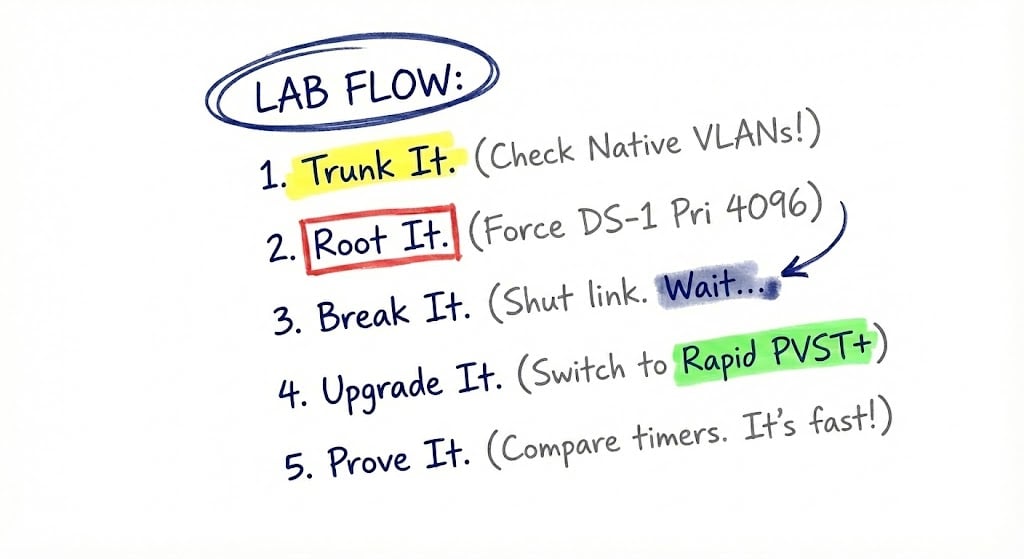
You can replicate this sequence in any EVE-NG environment, but teams using CloudMyLab's hosted setup typically finish it in under an hour, including the time spent staring at port states wondering why they aren't what you expected. Here's the flow:
Establish Layer 2 adjacency
Start by bringing up trunk links between your distribution switches and down to the access layer. Verify that your native VLAN settings match (mismatched native VLANs are responsible for roughly 40% of "why isn't this working" troubleshooting sessions), confirm allowed VLANs, and check trunk state on all ports.
Use show interfaces trunk liberally. This is the foundation. If trunking isn't solid, nothing else will work right, and you'll waste an hour chasing spanning tree issues that don't actually exist.
Baseline with 802.1D STP
Configure bridge priorities to force DS-1 as the root bridge. By default every switch ships with bridge priority 32768, so unless you change it, the lowest MAC address wins root election by accident. Pro tip: use spanning-tree vlan 1 priority 4096 instead of relying on MAC address tie-breaks. Explicit is better than implicit when you're trying to figure out what happened six months from now.
Pull show spanning-tree output on every switch to document root bridge ID, port roles, and path costs. Pay attention to which ports are forwarding, which are blocking, and where your designated uplinks actually are (as opposed to where you think they should be). This is your baseline. Screenshot it.
Inject a fault
Shut down one of the designated uplinks (say, the link between DS-1 and AS-1) and watch what happens. Time how long it takes for the topology to converge to a stable state. If you've got debug spanning-tree events running, you'll see exactly what the switches are thinking as they work through the problem.
Then restore the link and capture the reconvergence time. With classic 802.1D, you're probably looking at 30-50 seconds of disruption while the topology cycles through blocking → listening (15 sec) → learning (15 sec) → forwarding. That's an eternity when you're on a conference bridge with the entire IT leadership team asking when connectivity will be restored.
Enable RSTP (802.1w)
Now convert all switches to rapid spanning tree mode (spanning-tree mode rapid-pvst on Cisco platforms) and repeat the same fault tests. The convergence improvement should be dramatic—often sub-second for local failures where alternate paths already exist.
You'll also notice different port roles (like "alternate" and "backup" instead of just "blocking") and a collapsed set of port states. RSTP boils five STP states down to three (discarding, learning, forwarding) and replaces the timer-based listening period with a proposal/agreement BPDU handshake every switch can originate. Document these differences because this is exactly what you'll reference when someone inevitably asks "why should we migrate to RSTP?" (The answer: because 30-second outages are unacceptable, but sub-second failover is pretty great.)
Document outcomes
Capture your final port states for both STP and RSTP configurations. Note the expected root bridge under normal conditions and under degraded scenarios (like if DS-1 decides to go offline at 2 AM). Include your measured convergence times. Even rough qualitative observations like "under 1 second" are useful when you're building operational runbooks.
The point isn't to generate a formal report that nobody will read; it's to build operational knowledge your team can use when troubleshooting at 3 AM and questioning every life decision that led to this moment.
Why hosted EVE-NG matters
Running this lab locally means dealing with IOSvL2 image files that aren't exactly tiny, CPU contention between your video call and your four virtual switches, and the nagging feeling that you're about to run out of RAM mid-test. (You are. Your laptop will let you know by freezing completely at the worst possible moment.)
CloudMyLab's hosted EVE-NG environment takes all that friction away.
Here's what changes when you move to hosted:
Zero local setup: No image wrangling, no hypervisor configuration arguments, no "why won't this device boot" debugging sessions that eat your entire afternoon. You get a working topology, pre-loaded with the right Cisco IOSvL2 versions, ready to start testing the moment you log in.
Multi-user sessions: Your entire team can connect to the same topology simultaneously, which is huge for collaborative troubleshooting. When you shut down that uplink in step 3, everyone can watch their assigned switch's port states change in real time. That means you're building shared understanding instead of passing around screenshots in Slack and trying to explain what happened.
Repeatable baselines: Save golden snapshots before you start testing. Run your fault injection scenarios. Break things spectacularly (maybe even more spectacularly than you intended). Then revert to a known-good state in seconds and try a different approach. Compare STP behavior against RSTP behavior without rebuilding the entire environment each time. This is the kind of workflow that's theoretically possible locally but practically painful.
Expandable scope: This is Lab 1-1, but the EVE-NG Lab Library includes follow-on topologies for MSTP (Lab 1-2), VTP (Lab 1-3), EtherChannel (Lab 1-4), SPAN/RSPAN (Lab 1-5), and Private VLANs (Lab 1-6). You're not limited by local resources. Spin up the next topology without worrying about whether your laptop can handle another three switches.
The real advantage is that you're proving outcomes hands-on, under realistic conditions, without the infrastructure overhead becoming the bottleneck.
Who this lab is for?
This isn't a certification study exercise, though it's excellent prep for CCNP if that's where you're headed. It's practical validation for actual network changes that affect real users who will absolutely let you know if something breaks.
Network engineering teams use it to validate L2 designs before maintenance windows. If you're about to adjust spanning tree priorities, add new distribution switches, or migrate from PVST+ to RSTP, running this lab first means you'll catch surprises in the test environment instead of discovering them at 9 PM on a Tuesday when the entire finance department can't access the ERP system.
MSPs run it to standardize repeatable proofs for multi-tenant switching designs. When you need to demonstrate how a client's access layer will behave during an uplink failure or more importantly, during the inevitable moment when someone plugs both ends of a cable into the same switch. Having a documented test beats theoretical explanations every single time. Clients trust what they can see.
Enterprises migrating from legacy spanning tree implementations to RSTP or MSTP treat this as a proof-of-concept for their migration strategy. You can model your current state with classic STP, test the proposed RSTP configuration, and measure exactly what convergence improvements you'll see.
See it running
Want to see this STP/RSTP lab running in a hosted EVE-NG instance without spending your afternoon wrestling with hypervisor configurations?
We'll provision a ready-to-test topology from EVE-NG's Lab Library and walk your team through root bridge election, fault injection, and convergence scenarios. You'll see exactly how RSTP improves on classic STP's convergence times and you'll understand why that matters for your production network.
No hardware required. No local setup. No waiting for your laptop to stop sounding like it's preparing for liftoff.
Frequently asked questions
What is STP in networking?
STP (Spanning Tree Protocol) is the IEEE 802.1D standard that prevents Layer 2 loops in switched Ethernet networks. It elects a single root bridge, calculates the lowest-cost path from every switch to that root, and selectively places redundant ports into a blocking state. Without STP, redundant links between switches would cause broadcast storms and MAC table instability.
What is the difference between STP and RSTP?
STP (802.1D) takes 30-50 seconds to converge after a topology change because each port has to step through five states (disabled, blocking, listening, learning, forwarding) on timer-driven transitions. RSTP (802.1w) reduces that to three states (discarding, learning, forwarding) and replaces timers with a proposal/agreement BPDU handshake, dropping convergence to sub-second on most failures. Both share the same default bridge priority of 32768 and 2-second hello interval.
How does STP elect a root bridge?
Every switch sends BPDUs advertising a bridge ID, which is the bridge priority (default 32768) concatenated with its MAC address. The switch with the lowest bridge ID wins root election. If priorities tie, the lowest MAC address breaks the tie. To force a specific switch as root, lower its priority explicitly with spanning-tree vlan 1 priority 4096 rather than relying on MAC tie-breaks.
What are STP port states?
Classic 802.1D STP defines five port states: disabled, blocking, listening, learning, and forwarding. After a topology change, a port spends 15 seconds in listening (no MAC learning, no forwarding) and another 15 seconds in learning (MAC learning, no forwarding) before reaching forwarding. That timer-based progression is why STP convergence takes 30-50 seconds.
What are RSTP port states and how do they differ from STP?
RSTP collapses STP's five states into three: discarding (replaces disabled, blocking, and listening), learning, and forwarding. Combined with the new port roles (root, designated, alternate, backup) and the proposal/agreement handshake, RSTP allows a port to move directly from discarding to forwarding without waiting on listening/learning timers. The result is sub-second failover for most local link failures.
How long does STP take to converge?
Classic 802.1D STP takes 30-50 seconds to converge after a topology change, made up of the max-age timer (20 seconds, optional on direct failures) plus 15 seconds in listening and 15 seconds in learning. RSTP (802.1w) typically converges in well under a second when an alternate path already exists in the topology, because it transitions ports directly via the BPDU handshake instead of relying on timers.
What is BPDU in spanning tree?
A BPDU (Bridge Protocol Data Unit) is the message switches exchange every 2 seconds to share spanning-tree state: bridge IDs, root path cost, port roles, and timer values. In 802.1D, only the root bridge originates Configuration BPDUs and other switches relay them. In 802.1w (RSTP), every switch generates its own BPDUs and uses them to negotiate fast transitions through the proposal/agreement handshake.
Should I use STP or RSTP?
Use RSTP for any modern production network. It is backward compatible with 802.1D, ships enabled by default on most current switch platforms, and converges sub-second instead of 30-50 seconds. The only reason to keep classic STP is interoperability with legacy gear that genuinely cannot speak 802.1w. If your VLAN count is large (30+), look at MSTP (802.1s) instead, covered in Lab 1-2.
