
 By
·
20 minute read
By
·
20 minute read
NAT (Network Address Translation) is a method a router or firewall uses to map private IP addresses inside a network to public IP addresses on the internet, allowing many devices to share a single public IP while keeping internal addresses hidden. If the internet had stuck rigidly to the original design of IPv4, it would have ground to a halt decades ago. With only 4.29 billion addresses available, we technically ran out of space in the early 2010s. The technology that saved the internet, and remains a cornerstone of network architecture today, is Network Address Translation (NAT).
Table of contents
- What Is NAT (Network Address Translation)?
- How Does NAT Work Under the Hood?
- What Are the Different Types of NAT?
- What Is the Difference Between SNAT and DNAT?
- NAT, Routing, and Security
- NAT in Cloud and Hybrid Architectures
- Hands-on: Designing and Configuring NAT
- Common NAT Design and Troubleshooting Scenarios
- What Is Double NAT and How Does It Affect Your Network?
- How to Learn and Practice NAT with Labs
- Conclusion
What Is NAT (Network Address Translation)?
NAT (Network Address Translation) is a method a router or firewall uses to map private IP addresses inside your network to public IP addresses on the internet, allowing many devices to share a single public IP while keeping internal addresses hidden.
More precisely, NAT modifies IP address (and sometimes port) information in packet headers as traffic traverses a NAT device. It maps private addresses used inside a network (for example, 192.168.1.10) to one or more public addresses used outside (for example, 203.0.113.10), and tracks these mappings in a translation table.
A simple home example:
- Devices on your Wi-Fi use private IPs like
192.168.0.10or192.168.0.20. - Your ISP gives the router a single public IP.
- NAT on the router lets all those devices share the one public IP when they browse the internet.
This combination of address conservation, abstraction, and basic isolation is why NAT is still a core concept in networking.
Why Do We Still Need NAT?
While IPv6 was designed to render NAT obsolete by providing a virtually infinite address space, NAT remains ubiquitous in IPv4 environments and is even finding new life in IPv6 transition mechanisms (NAT64).
For the modern network engineer, NAT is not just about IP conservation. It is a critical tool for:
- Security & Obscurity: Hiding internal network structures from external reconnaissance.
- Mergers & Acquisitions: Handling overlapping IP subnets when integrating two distinct corporate networks.
- Flexible ISP Migration: Changing upstream providers without re-addressing thousands of internal endpoints.
How Does NAT Work Under the Hood?
NAT sits between an "inside" (usually private) network and an "outside" (usually public or upstream) network.
The Translation Table
When a router performs NAT, it creates an entry in a table (the NAT table) linking the internal IP address to the external IP address. This "state" allows the router to know where to send the return traffic. If a packet arrives from the internet that doesn't match an active session in the translation table, the router drops it (a feature often confused with firewalling).
A simplified NAT translation table might look like this:
| Inside IP | Inside Port | Outside IP | Outside Port | Protocol |
|---|---|---|---|---|
| 192.168.1.100 | 1050 | 203.0.113.10 | 50005 | TCP |
| 192.168.1.120 | 1100 | 203.0.113.10 | 50006 | TCP |
From the internal host's perspective, this process is transparent. The host sends and receives packets as usual; only the NAT device modifies headers and maintains state.
Outbound Flow (Inside → Outside)
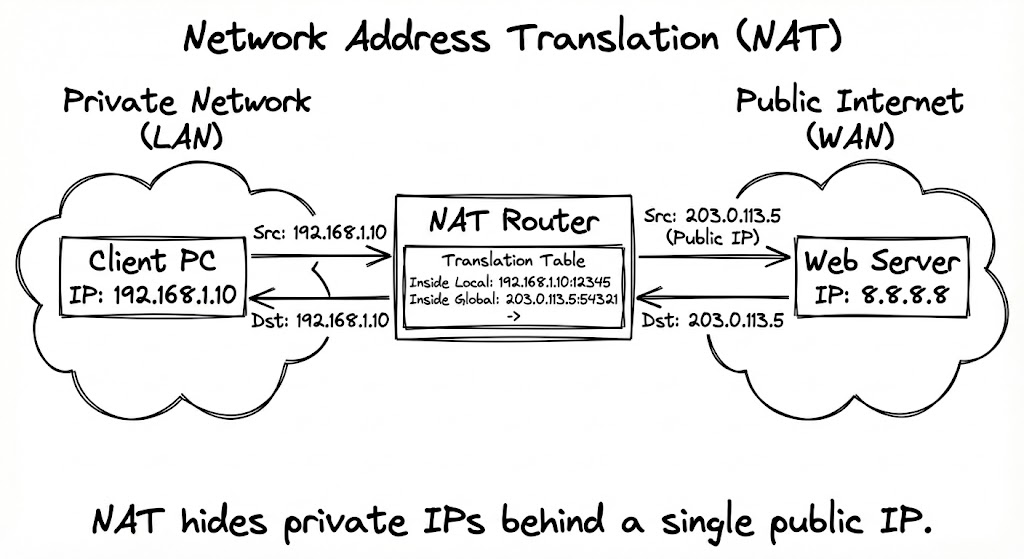
A host with a private IP (for example, 192.168.1.100) sends a packet to an internet destination. The packet reaches the NAT device, which creates or reuses a translation entry, replacing the source IP and often the source port with a public IP and port. The packet is forwarded toward the destination with the translated source values.
In this case, note these terms:
Outside Global: The IP address of the destination host as it appears to the outside world (e.g., Google's DNS 8.8.8.8).
Outside Local: The IP address of the destination host as it appears to the inside host. (In most standard NAT scenarios, this is identical to the Outside Global address, unless you are doing advanced Destination NAT).
Inbound Return Traffic (Outside → Inside)
The external server replies to the translated public IP and port. The NAT device looks up the entry in its translation table, rewrites the destination IP and port back to the internal values, and forwards the packet to the original host.
In this case, note these terms:
Inside Local: The actual IP address assigned to a host on the private network (e.g., 192.168.1.10).
Inside Global: The IP address of the inside host as it appears to the outside world (e.g., 203.0.113.5). This is usually the public IP after translation.
Cisco NAT Terminology at a Glance
Understanding Cisco's four NAT terms is essential for certification exams and real-world troubleshooting. Here is a quick reference:
| Term | Meaning | Example |
|---|---|---|
| Inside Local | Private IP of the internal host | 192.168.1.10 |
| Inside Global | Public IP representing the internal host after NAT | 203.0.113.5 |
| Outside Local | How the internal host sees the external destination (usually same as Outside Global) | 8.8.8.8 |
| Outside Global | Actual public IP of the external destination | 8.8.8.8 |
In a standard outbound NAT scenario, the router replaces the Inside Local address with the Inside Global address. Return traffic reverses the process. The Outside Local and Outside Global are typically identical unless you are performing advanced destination NAT.
Layer 3 and Layer 4 Modification
NAT doesn't just swap IP addresses.
Layer 3 (Network): The router recalculates the header checksum because the Source IP (and potentially Destination IP) has changed.
Layer 4 (Transport): If Port Address Translation (PAT) is being used, the router modifies the Source Port in the TCP/UDP header. Consequently, the TCP/UDP checksum must also be recalculated.
What Are the Different Types of NAT?
NAT behavior varies by how many addresses are mapped and how dynamic those mappings are. The main patterns you'll work with are:
Static NAT (One-to-One)
Static NAT creates a permanent, fixed mapping between one Inside Local address and one Inside Global address.
Use cases:
- Publishing internal servers (web, mail, VPN) that need to be accessible from the internet at a consistent address.
- Making a lab device reachable externally with a dedicated public IP
Pros / Cons: Static NAT is straightforward to understand and troubleshoot, but it consumes one public IP address for each internal host you publish.
A simple static NAT concept:
- Inside server:
192.168.10.10 - Static mapping:
192.168.10.10↔203.0.113.10
Cisco IOS configuration example:
interface GigabitEthernet0/0
 ip address 203.0.113.1 255.255.255.0
 ip nat outside
!
interface GigabitEthernet0/1
 ip address 192.168.10.1 255.255.255.0
 ip nat inside
!
ip nat inside source static 192.168.10.10 203.0.113.10
Dynamic NAT (Pool-Based)
Dynamic NAT maps a private IP to a public IP from a pool of available public addresses.
You own a pool of 5 public IPs. When user A wants to go online, they grab the first available IP. When user B connects, they grab the second. When user A logs off and the timeout expires, that IP returns to the pool.
Use cases:
- Guest networks or specific internal departments where users need public identities but not fixed ones.
- Environments where outbound initiation is allowed, but inbound is tightly controlled
Pros / Cons: Scales better than one-to-one, but still limited by pool size. If your pool runs out, new connections fail. And this is something you definitely want to discover in a lab, not during a production cutover. More secure than Static NAT (internal IPs change).
Cisco IOS configuration example (Dynamic NAT with a pool):
R1(config)# ip nat pool MYPOOL 203.0.113.20 203.0.113.30 netmask 255.255.255.0
R1(config)# access-list 10 permit 192.168.10.0 0.0.0.255
R1(config)# ip nat inside source list 10 pool MYPOOL
PAT / NAT Overload (Many-to-One)
This is what most people mean when they say "NAT." Port Address Translation (PAT), also known as NAT Overload, allows thousands of private hosts to share a single public IP address.
The router uses unique Source Port numbers to distinguish between different "conversations."
- User A sends traffic: Router translates it to
203.0.113.5:1024. - User B sends traffic: Router translates it to
203.0.113.5:1025.
Use cases:
- Home routers and many enterprise edges
- Labs where dozens of virtual routers/hosts exit through one public IP
Pros / Cons: Extremely scalable, but it requires careful troubleshooting when many flows share one address. Ever tried debugging why one specific session is failing when 500 others are working fine through the same NAT? It's about as fun as it sounds.
Cisco IOS configuration example (PAT / NAT overload):
interface GigabitEthernet0/0
 ip address 203.0.113.1 255.255.255.0
 ip nat outside
!
interface GigabitEthernet0/1
 ip address 192.168.10.1 255.255.255.0
 ip nat inside
!
ip nat inside source list 10 interface GigabitEthernet0/0 overload
access-list 10 permit 192.168.10.0 0.0.0.255
Policy-Based NAT
These are NAT decisions based on policy, ACLs, route-maps, zones, or other criteria beyond just source/destination.
Use cases:
- Different internal subnets using different public IPs
- Multi-tenant environments where each tenant needs distinct translation behavior
Pros / Cons: Flexible but more complex. This is the kind of setup you definitely want to practice in a lab before deployment, because troubleshooting policy NAT in production at 2 AM is nobody's idea of a good time.
Cisco IOS configuration example (policy-based NAT with route-maps):
R1(config)# access-list 101 permit ip 192.168.10.0 0.0.0.255 any
R1(config)# access-list 102 permit ip 192.168.20.0 0.0.0.255 any

R1(config)# route-map NAT-MAP-10 permit 10
R1(config-route-map)# match ip address 101
R1(config-route-map)# set interface GigabitEthernet0/0

R1(config)# route-map NAT-MAP-20 permit 10
R1(config-route-map)# match ip address 102
R1(config-route-map)# set interface GigabitEthernet0/1

R1(config)# ip nat inside source route-map NAT-MAP-10 interface GigabitEthernet0/0 overload
R1(config)# ip nat inside source route-map NAT-MAP-20 interface GigabitEthernet0/1 overload
Provider-Side NAT / CGNAT
ISPs faced the IPv4 exhaustion crisis long before enterprises did. To cope, they implemented Carrier Grade NAT (CGNAT), sometimes called NAT444 when combined with customer-side NAT.
In a standard residential setup, the customer's router holds a public IP. In a CGNAT architecture, the ISP's router holds the public IP.
- Network 1: The Customer LAN (Private
192.168.x.x). - Network 2: The ISP Access Network (Shared Private
100.64.x.x— Reserved specifically for Shared Address Space per RFC 6598). - Network 3: The Public Internet.
The Engineering Challenge:
CGNAT breaks the end-to-end principle of the internet even more severely than standard NAT.
- Port Allocation: ISPs must limit how many TCP/UDP ports a single subscriber can use to prevent one user from exhausting the shared public IP.
- "Noisy Neighbors": If one user on a shared CGNAT IP gets blacklisted (e.g., for spamming), all users sharing that IP suffer the consequences.
NAT64 (IPv6–IPv4 Translation)
This is the translation between IPv6-only and IPv4-only networks (for example, IPv6 clients reaching IPv4 servers).
Use cases:
- Gradual IPv6 adoption, dual-stack transitions
Pros / Cons: Important in service provider and large enterprise networks. A good candidate for advanced labs if you're working on IPv6 migration strategies.
Cisco IOS XE configuration example (NAT64):
nat64 v4 pool V4POOL 203.0.113.100 203.0.113.110 prefix-length 24
nat64 v6v4 list V6-ACL pool V4POOL overload
!
ipv6 access-list V6-ACL
 permit ipv6 2001:db8:1::/64 any
Note: NAT64 configuration syntax varies by platform (IOS vs IOS XE vs NX-OS). The example above uses modern IOS XE syntax. Always verify commands against your specific platform documentation.
NAT Types at a Glance
| Feature | Static NAT | Dynamic NAT | PAT (Overload) | CGNAT | NAT64 |
|---|---|---|---|---|---|
| Mapping | 1:1 (fixed) | Pool-based | Many:1 | ISP-level many:1 | IPv6 ↔ IPv4 |
| Public IPs needed | 1 per host | Pool size | 1 | 1 per many subscribers | IPv4 pool |
| Inbound access | Yes | No (by default) | No | No | Depends on config |
| Scalability | Low | Medium | High | Very high | Medium |
| Complexity | Low | Medium | Low | High | High |
| Best for | Servers, DMZ | Guest networks | Most networks | ISPs | IPv6 migration |
What Is the Difference Between SNAT and DNAT?
SNAT (Source NAT) and DNAT (Destination NAT) describe which part of the packet header gets translated, and the distinction matters for both configuration and troubleshooting.
Source NAT (SNAT) modifies the source IP address of outbound packets. This is the most common form of NAT. When internal users browse the internet, the router replaces their private source IP with a public IP. PAT is a form of SNAT that also translates source ports.
Destination NAT (DNAT) modifies the destination IP address of inbound packets. This is what happens when you set up port forwarding: external traffic arrives at your public IP on a specific port, and the router rewrites the destination to an internal server's private IP. Static NAT for publishing services is a form of DNAT.
| SNAT (Source NAT) | DNAT (Destination NAT) | |
|---|---|---|
| Modifies | Source IP (and port) | Destination IP (and port) |
| Direction | Outbound (inside → outside) | Inbound (outside → inside) |
| Common use | Internet access for internal users | Port forwarding, load balancing |
| Cisco IOS | ip nat inside source |
ip nat inside source static (with port) |
| Linux iptables | POSTROUTING -j SNAT or MASQUERADE |
PREROUTING -j DNAT |
| Example | 192.168.1.10 → 203.0.113.5 |
203.0.113.5:80 → 192.168.1.50:80 |
In practice, most NAT configurations involve both: SNAT for outbound traffic and DNAT for inbound services. Understanding the distinction helps when reading firewall logs, where pre-NAT and post-NAT addresses tell different stories depending on which translation you are looking at.
NAT, Routing, and Security
NAT vs Routing
Let's clear up a common confusion: NAT and routing are not the same thing, even though they often happen on the same device.
- Routing: Decides the next hop based on destination IP and the routing table
- NAT: Rewrites source/destination addresses (and ports) as packets traverse the device
Key points you need to understand:
- NAT usually operates at the edge of a routing domain
- Dynamic routing protocols (OSPF, EIGRP, BGP) typically run on interfaces behind or on the NAT device. The translated addresses are mainly used toward external peers
- You need to ensure that route advertisements and NAT behavior align (static routes or default routes toward the NAT device, for example)
NAT vs Firewall Security
NAT is often colocated with a firewall, which leads to the persistent myth that NAT is a security feature. It isn't.
What NAT does:
- Hides internal IP addressing from external networks
- Blocks unsolicited inbound sessions by default in most PAT scenarios (no translation entry means no forwarding)
What NAT does not do:
- Inspect payloads for threats
- Enforce application- or user-level policy
- Replace proper firewall rules, IPS/IDS, or zero-trust controls
A clear security model treats NAT as address translation, and the firewall or NGFW as policy enforcement. They work together, but they're not interchangeable.
NAT Traversal and VPNs
One of the most notorious headaches in networking is passing IPSec VPN traffic through a NAT device.
IPSec (specifically the ESP protocol) relies on checksums to verify data integrity. Standard NAT modifies IP headers and ports. When the receiving VPN gateway sees that the packet header was modified in transit (by the NAT device), it assumes the packet was tampered with and drops it.
NAT-Traversal (NAT-T) encapsulates the IPSec ESP packets inside a UDP wrapper (typically on port 4500). This allows the NAT device to translate the outer UDP header without breaking the inner encrypted payload.
Observability: Logs and Translation Tables
For troubleshooting and incident response, translation visibility is critical, and often overlooked until something breaks.
NAT translation tables map internal addresses/ports to external ones. You need to know how to read these, because they're your first stop when debugging connectivity issues.
Logs (syslog, flow logs, firewall logs) may include both pre- and post-NAT values. Understanding which value you're looking at is essential for correlating events.
Packet captures at inside and outside interfaces let you see translations in practice. This is where you catch the "it works from here but not from there" issues.
These are all ideal activities to run in controlled NAT labs before you're troubleshooting production incidents under time pressure.
NAT in Cloud and Hybrid Architectures
Cloud platforms frequently embed NAT into egress and connectivity services, which can make things either beautifully simple or frustratingly opaque (depending on how well you understand what's happening under the hood).
NAT gateways / egress NAT: Instances in private subnets reach the internet using a NAT gateway or instance. This is similar to on-prem PAT, but typically fully managed by the provider, which means less control, but also less operational overhead.
NAT in Cloud Networks (AWS/Azure)
When you lift and shift to the cloud, the concept of a physical "interface" blurs.
In AWS or Azure, you typically don't configure ip nat inside on a virtual router interface. Instead, you deploy a NAT Gateway. This is a highly available, managed service that scales bandwidth automatically.
You can still run a Linux or Cisco CSR1000v instance as a NAT router, but this is generally discouraged for production due to the lack of inherent redundancy.
Cloud NAT gateways generally do not support security groups in the same way a firewall does; they are purely for outbound connectivity for private subnets.
Hybrid designs (on-prem + cloud): On-prem edges perform NAT toward cloud connections (VPN, Direct Connect, ExpressRoute, etc.). The cloud side may also apply NAT, especially for internet-facing services. Overlapping private address space between sites or regions often requires additional NAT layers, and this is where things get interesting (i.e. complicated).
For proofs-of-concept, it's valuable to:
- Model both the on-prem edge and a cloud-like NAT gateway in a lab
- Validate routing, NAT order of operations, and monitoring before rollout
- Experiment with overlapping address spaces and multiple tunnels
CloudMyLab's hosted network emulators can approximate these hybrid scenarios, letting you test NAT and routing interactions across multiple segments without touching production.
Hands-on: Designing and Configuring NAT
Theory is essential, but muscle memory means, to truly understand NAT, you need to build it.
Scenario A: The Enterprise Edge (Cisco IOS PAT)
This is the bread-and-butter configuration for any branch office connecting to the internet.
1. Define the Interfaces:
First, tell the router which interface is trusted (Inside) and which faces the internet (Outside).
Router(config)# interface GigabitEthernet0/0
Router(config-if)# ip address 192.168.10.1 255.255.255.0
Router(config-if)# ip nat inside
Router(config-if)# exit

Router(config)# interface GigabitEthernet0/1
Router(config-if)# ip address 203.0.113.2 255.255.255.252
Router(config-if)# ip nat outside
Router(config-if)# exit
2. Identify Interesting Traffic:
Create an Access Control List (ACL) to define who is allowed to be translated.
Router(config)# access-list 10 permit 192.168.10.0 0.0.0.255
3. Apply the Translation (Overload):
Link the ACL to the outside interface and enable the "overload" keyword to activate PAT (Port Address Translation).
Router(config)# ip nat inside source list 10 interface GigabitEthernet0/1 overload
Scenario B: Publishing a Service (Static NAT)
If you have a web server inside your LAN (192.168.10.50) that needs to be reachable from the outside world on port 80.
Router(config)# ip nat inside source static tcp 192.168.10.50 80 203.0.113.2 80
Validation and Troubleshooting
Once configured, you need to verify the translation is occurring.
The "Truth" Table
Router# show ip nat translations

Pro  Inside global       Inside local        Outside local       Outside global
icmp 203.0.113.2:1024    192.168.10.5:1      8.8.8.8:1           8.8.8.8:1024
Interpretation: The internal host 192.168.10.5 (inside local) has been translated to 203.0.113.2 (inside global) using ICMP identifier 1024.
Real-Time Debugging
If translations aren't building, use debugs carefully (ensure you are in a lab environment like CloudMyLab, as this can crash a production router under load):
Router# debug ip nat
Common NAT Design and Troubleshooting Scenarios
NAT-related issues often show up as "it works from here but not from there". One of the most frustrating phrases in networking. Common patterns include:
Overlapping private address spaces: Mergers, acquisitions, and multi-tenant environments often bring multiple 10.0.0.0/8 or 192.168.0.0/16 spaces together. NAT on one or both sides can resolve overlaps, but it must be thoroughly documented and tested. (Documentation is the part everyone skips, which is why overlapping address troubleshooting is always such a mess.)
NAT Pool Exhaustion
When using Dynamic NAT (without PAT), you have a finite number of public IPs. If you have a pool of 5 IPs and the 6th user attempts to connect, the router has no public IP to assign them.
Symptoms: Intermittent connectivity for users; some get out, others don't.
Check the pool usage statistics. You likely need to migrate to PAT (Overload) or request a larger block from your ISP.
Asymmetric Routing
This is the classic "packets go out, but don't come back" scenario, common in multi-ISP setups. Traffic leaves via ISP A (Router A performs NAT). The return traffic comes back via ISP B.
Router B has no entry in its NAT translation table for that specific session. It sees a packet destined for an internal private IP (which it can't route) or a public IP it doesn't own, and drops it.
NAT requires symmetric traffic flows. The device that translates the outbound packet must process the inbound return packet.
Limited public IP space shared across many sites: Branch offices share a small pool of public addresses. CGNAT in ISPs adds another layer of translation upstream. Each layer of NAT is another potential failure point and another layer of complexity when you're trying to track down where packets are getting dropped.
Order of Operations
Does the router route the packet first, or translate it first?
- Inside-to-Outside: The router checks the Policy routing, then Routing, and then performs NAT.
- Outside-to-Inside: The router performs NAT first (translating the destination back to private), and then performs Routing.
If your ACLs are blocking traffic based on IP addresses, you need to know whether to match the private or the public IP based on where the ACL is applied.
NAT traversal issues with VPNs: IPsec and other VPNs may require NAT-T support when devices sit behind NAT. Double-NAT scenarios can break expectations unless carefully designed. This is one of those areas where lab testing pays massive dividends.
Application protocols that embed IPs/ports: Some protocols carry IP information in the payload, not just in headers. NAT devices may need ALG (Application Layer Gateway) support, or the application itself may need changes. FTP, SIP, and H.323 are classic examples, they work fine until they suddenly don't, and then you're reading RFCs at midnight.
Here's a repeatable troubleshooting workflow you can rehearse in a lab:
- Confirm basic IP connectivity and routing (ping, traceroute, mtr)
- Inspect NAT translations (
show ip nat translations, firewall NAT views, etc.) - Capture packets on inside and outside interfaces (tcpdump, Wireshark, or emulator capture tools)
- Compare pre-NAT and post-NAT headers
- Validate firewall rules, security policies, and VPN configuration
Running this workflow first in a CloudMyLab NAT lab makes production troubleshooting faster and way less error-prone. You've already made the mistakes and fixed them in a safe environment.
What Is Double NAT and How Does It Affect Your Network?
Double NAT occurs when your traffic passes through two separate NAT devices in sequence, each performing its own address translation. This creates a situation where packets are translated twice before reaching the internet.
The most common scenario is an ISP modem that performs NAT combined with your own router also performing NAT. Your device's private IP gets translated to the router's address, which then gets translated again to the ISP modem's public IP. Two translation tables, two layers of state tracking, and twice the potential for things to break.
Common double NAT symptoms:
- Gaming consoles report "strict NAT" or "NAT Type 3," preventing peer-to-peer matchmaking
- Port forwarding rules on your router have no effect (the ISP modem blocks inbound traffic before it reaches your router)
- VoIP calls experience one-way audio or dropped connections
- Remote desktop and VPN connections fail intermittently
How to detect double NAT: Check your router's WAN IP address. If it starts with 10.x.x.x, 172.16-31.x.x, or 192.168.x.x, you are behind another NAT device upstream.
How to fix it:
- Bridge mode: Put the ISP modem into bridge mode so it passes the public IP directly to your router. This eliminates the first NAT layer.
- DMZ: Configure the ISP modem to forward all traffic to your router's WAN IP. Not as clean as bridge mode, but works when bridge mode is unavailable.
- Replace the ISP modem: Use your own modem that doesn't perform NAT.
- Request a public IP: Some ISPs will assign a static public IP to your modem upon request, bypassing CGNAT.
Double NAT is one of those problems that is much easier to diagnose and fix when you understand the fundamentals. If you've practiced NAT in a lab environment, you'll recognize the symptoms immediately instead of spending hours chasing the wrong issue.
How to Learn and Practice NAT with Labs
NAT concepts become much clearer when you see translations happening in real time. This is where labs, PoCs, and repeatable topologies are especially useful. Because reading about NAT and doing NAT are completely different experiences.
Example Lab 1: Basic Inside-to-Outside PAT
Goal: Allow an internal subnet to access the internet using a single public IP.
Topology:
- Inside LAN (for example,
192.168.10.0/24) - Edge router or firewall acting as NAT/PAT device
- Simulated "internet" segment and external server
Validation:
- ping and HTTP tests from inside hosts
- NAT translation table inspection and logs
- Packet captures showing address translation
In CloudMyLab, you can model this with Hosted Emulators (enterprise routers/firewalls) connected to a simple simulated ISP cloud. Build it, break it, fix it, repeat.
Example Lab 2: Static NAT for Inbound Services
Goal: Publish an internal server (web, SSH, or VPN) via a static public IP.
Topology:
- Internal server in DMZ or LAN
- NAT device with static one-to-one mapping
- External test client segment
Validation:
- Access service via public IP
- Confirm that logs show the mapping
- Verify that security policies restrict unwanted access (because publishing a server without proper firewall rules is a bad idea)
Example Lab 3: NAT with IPsec VPNs (NAT-T, Overlapping Spaces)
Goal: Understand how NAT interacts with site-to-site VPNs and NAT-T.
Topology:
- Two sites with overlapping private ranges
- NAT at one or both edges plus IPsec tunnels
Validation:
- Verify tunnel establishment
- Confirm that translated addresses are used as expected
- Capture and inspect encrypted and decrypted traffic
- Watch what happens when you don't enable NAT-T (spoiler: it doesn't work)
Example Lab 4: Simulating Provider/CGNAT Behavior
Goal: See how provider NAT affects inbound access and logging.
Topology:
- Customer CPE performing PAT
- "ISP" router performing CGNAT toward an upstream network or internet stub
Validation:
- Observe double NAT in translation tables
- Test how inbound connections are constrained
- Experience the logging nightmare that CGNAT creates (so you understand why ISP support always asks for so much information)
Whether you use GNS3, EVE-NG, or Cisco CML, building these topologies in a hosted lab environment lets you experiment without risking production networks. CloudMyLab's free trial gives you access to enterprise-grade emulators to practice every NAT scenario covered in this guide.
Conclusion
NAT is foundational for network engineers working on enterprise edges, ISPs, and cloud or hybrid designs. Understanding how translations interact with routing, security, VPNs, and application behavior is much easier after you've seen the packets and translation tables in action. Preferably multiple times, with different configurations, and at least a few spectacular failures along the way.
CloudMyLab provides:
- Learning Labs that walk through core NAT patterns (static, dynamic, PAT, policy NAT, CGNAT) with step-by-step validation
- Hosted Emulators so you can configure real vendor-style routers and firewalls and inspect NAT tables and logs
- Proof-of-Concept environments to prototype NAT-heavy designs such as hybrid cloud edges or multi-tenant overlays, before they reach production
For teams, universities, and training centers, standardizing on repeatable NAT lab blueprints in CloudMyLab helps align theory, configuration skills, and troubleshooting practice in one place. You learn by doing, not just by reading. And when you inevitably break something, you're breaking it in an environment where nobody gets paged.
FAQs
What is NAT in networking with an example?
NAT translates a private IP address (for example, 192.168.1.100) to a public IP (for example, 203.0.113.10) when traffic leaves the network, and uses a translation table to map return traffic back to the original host. It's like having a company phone system where everyone inside has an extension, but outside callers only see the main number.
What is the difference between NAT and PAT?
Traditional NAT focuses on translating IP addresses, often one-to-one or using a pool. PAT (Port Address Translation) also translates source ports, allowing many internal hosts to share a single public IP by assigning unique port mappings. PAT is what most people are actually using when they say "NAT."
What is the primary purpose of NAT?
The primary purpose of NAT is to conserve IPv4 addresses by allowing multiple devices on a private network to share one or more public IP addresses. Secondary benefits include hiding internal network topology from external networks and simplifying network renumbering during ISP changes or mergers.
How does NAT increase security?
NAT hides internal addresses and blocks unsolicited inbound sessions in common configurations, but it does not inspect traffic or enforce detailed security policies. Proper firewalls and security controls are still required. Think of NAT as obscurity, not security.
Can NAT be used in lab simulations (e.g., in GNS3 or EVE-NG)?
Yes. NAT can be fully configured and tested on virtual routers and firewalls in emulated environments like GNS3, EVE-NG, or Cisco CML. Lab simulations are actually the best place to practice NAT because you can observe translation tables, capture packets, and break things without consequences.
Does NAT work with both IPv4 and IPv6?
NAT is primarily an IPv4 technology. IPv6 was designed with enough address space to eliminate the need for NAT. However, NAT64 enables translation between IPv6-only and IPv4-only networks during the transition period, and NPTv6 (Network Prefix Translation for IPv6) exists for specific multihoming scenarios.
How is a NAT forwarding table different from a routing table?
NAT tables track active private-to-public address mappings (translations) for individual sessions. Routing tables determine the next-hop forwarding path based on destination IP prefixes. NAT decides what address to use; routing decides where to send the packet.
How does NAT interact with VPNs?
When VPN endpoints sit behind NAT, features like NAT-T encapsulate VPN traffic so it can traverse translation devices. Multiple NAT layers and overlapping address space can complicate design. These scenarios are best tested in a lab before deployment (preferably several times).
Can NAT be practiced safely in a lab environment?
Yes, and you should practice it in a lab. NAT is ideal for lab work because you can build edge, DMZ, ISP, and cloud-like topologies, generate traffic, and observe translations without risking production networks. The mistakes you make in the lab are the mistakes you won't make in production.
Is NAT a firewall?
No. While NAT provides a degree of security by hiding internal IP addresses, it is not a security feature. NAT does not inspect traffic for malware, block specific applications, or prevent intrusion attempts. A stateful firewall is required for true network security. NAT hides the door number; a firewall locks the door.
Does NAT slow down the internet?
Technically, yes, but usually negligibly. Because the router must modify the IP header and recalculate the checksum for every packet, there is a processing cost. However, modern enterprise routers use hardware acceleration (like Cisco CEF) to perform these translations at wire speed. Latency is rarely noticeable unless the router's CPU is overwhelmed.
Can I run NAT on a switch?
Yes, if it is a Layer 3 switch (Multilayer Switch). High-end switches (like Cisco Catalyst 9000 series) support NAT, but they often have smaller translation table limits compared to dedicated edge routers. Layer 2 switches cannot perform NAT as they do not process IP headers.
What is the difference between SNAT and DNAT?
SNAT (Source NAT) modifies the source IP address of outbound packets, typically used when internal users access the internet. DNAT (Destination NAT) modifies the destination IP address of inbound packets, used for port forwarding and publishing internal servers. Most NAT configurations use both: SNAT for outbound traffic and DNAT for inbound services. See the full SNAT vs DNAT comparison above.
What is NAT loopback (hairpin NAT)?
NAT loopback (also called hairpin NAT) occurs when an internal host tries to access an internal server using the server's public (external) IP address. Without hairpin NAT configured, the router doesn't know to redirect traffic back inside the network, and the connection fails. The fix is to enable hairpin NAT on the router, or use split DNS so internal hosts resolve the server's hostname to its private IP instead.
How many devices can share one public IP with PAT?
Theoretically, PAT can support up to 65,535 simultaneous translations per public IP (one for each available port number). In practice, the limit is lower because routers reserve certain port ranges, and each active session consumes memory. Most enterprise routers handle 10,000 to 30,000 concurrent PAT translations comfortably. If you need more capacity, you can configure PAT with a pool of multiple public IPs.
