
The TCP 3-way handshake (three-way handshake) is how two devices open a TCP connection: the client sends a SYN with its initial sequence number, the server replies with a SYN-ACK that carries its own sequence number and acknowledges the client's number plus one, and the client sends a final ACK. After those three segments, both sides are in the ESTABLISHED state and data can flow. Tools and protocols you use every day, such as HTTP, SSH, BGP and Nmap, depend on it.
If you are troubleshooting a connection, writing firewall rules or studying for a certification, you need to read the handshake at the packet level: the sequence numbers, what it looks like in Wireshark, how it differs from the 4-way handshake that closes a connection, and how TCP differs from UDP.
New to CloudMyLab? It is a cloud-based network lab platform that lets you focus on building, testing, and automating networks, not managing hardware. Access professional-grade network emulators like EVE-NG, GNS3, and Cisco CML 2.0, plus pre-configured automation environments with Ansible, GitLab, and NetDevOps tools, all through a browser, VPN or jump host. Contact us to discuss your lab requirements or start a free trial.
Table of contents
- What is the TCP/IP 3-way handshake?
- How does the SYN, SYN-ACK, ACK sequence work?
- TCP 3-way handshake example with sequence numbers
- How do connection states change during the TCP 3-way handshake?
- What is the purpose of the TCP 3-way handshake?
- How to see the 3-way handshake in Wireshark
- 3-way handshake vs 4-way handshake: closing a TCP connection
- TCP vs. UDP: How does the TCP 3-way handshake differ from a UDP connection?
- How Nmap uses TCP for network scanning
- Real-world perspective for network engineers
What is the TCP/IP 3-way handshake?
Transmission Control Protocol (TCP) gives you reliable, ordered and error-checked communication between two devices. Unlike connectionless protocols such as UDP, which send data without any agreement, TCP sets up a session before any application data is sent. That is where the 3-way handshake comes in.
It is a three-step negotiation:
- The client proposes a connection and sends its Initial Sequence Number (ISN) in a SYN segment.
- The server acknowledges the client's ISN and sends its own ISN back in a SYN-ACK segment.
- The client sends a final ACK to acknowledge the server's ISN.
Once the final ACK arrives, both the client and the server are in the ESTABLISHED state, and application data can start flowing.
How does the SYN, SYN-ACK, ACK sequence work?
This exchange aligns the state on both the client and the server, so that later data arrives in order.
|
Step |
Direction |
Flags |
Purpose |
|---|---|---|---|
|
1 |
Client → Server |
SYN |
Propose a connection, send the client's Initial Sequence Number (ISN), suggest options such as MSS. |
|
2 |
Server → Client |
SYN, ACK |
Acknowledge the client's ISN, send the server's ISN, negotiate options. |
|
3 |
Client → Server |
ACK |
Acknowledge the server's ISN. Both sides reach ESTABLISHED. |
The final ACK usually carries no application data. Each side acknowledges the other's ISN plus one, because the SYN flag itself uses up one sequence number. ISNs are randomized, so an attacker cannot easily guess them.
Visualizing the Handshake
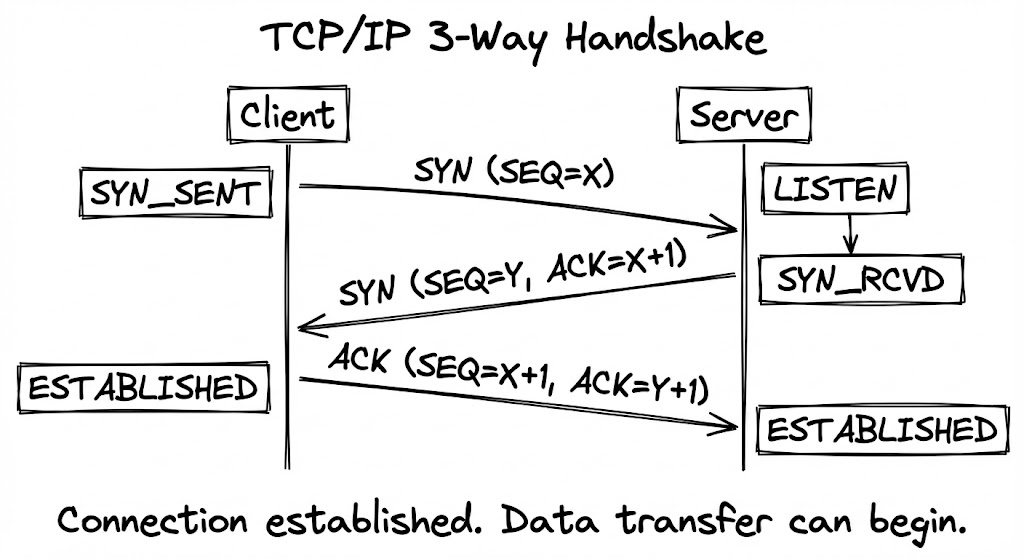
SYN (Synchronize): initiation
The client starts the connection by sending a TCP segment with the SYN flag set and its proposed Initial Sequence Number. In effect it says: "I would like to start a conversation, and I will number my bytes from here."
SYN-ACK (Synchronize-Acknowledge): response
The server receives the SYN and replies with a segment that has both the SYN and ACK flags set. The ACK acknowledges the client's request, and the SYN carries the server's own ISN. The server has set aside resources for the connection and waits for the client's confirmation.
ACK (Acknowledge): confirmation
The client sends one last ACK to confirm it received the server's SYN-ACK. The connection is open, and both sides can send data.
TCP 3-way handshake example with sequence numbers
Sequence numbers are easier to follow with real values. Suppose the client picks an ISN of 1000 and the server picks 5000:
|
Segment |
Flags |
Sequence number |
Acknowledgment number |
What it means |
|---|---|---|---|---|
|
1. Client → Server |
SYN |
seq = 1000 |
(none) |
The client picks ISN 1000. The SYN itself uses up one sequence number. |
|
2. Server → Client |
SYN, ACK |
seq = 5000 |
ack = 1001 |
The server picks ISN 5000 and expects the client's next byte to be 1001. |
|
3. Client → Server |
ACK |
seq = 1001 |
ack = 5001 |
The client confirms the server's ISN. Its first data byte will carry sequence number 1001. |
The rule to remember is that each acknowledgment number is the next sequence number the sender expects to receive. Because a SYN counts as one byte of sequence space, the server acknowledges 1001, not 1000, and the client acknowledges 5001. Real ISNs are large, unpredictable 32-bit values; Wireshark shows them as relative numbers starting at 0 by default, which is why a capture usually reads seq=0, then seq=0 ack=1, then seq=1 ack=1.
How do connection states change during the TCP 3-way handshake?
The handshake moves both ends through defined connection states:
|
Point in the exchange |
Client state |
Server state |
|---|---|---|
|
Before the connection |
CLOSED |
LISTEN |
|
Client has sent SYN |
SYN-SENT |
LISTEN |
|
Server has received SYN and sent SYN-ACK |
SYN-SENT |
SYN-RECEIVED |
|
Client has received SYN-ACK and sent ACK |
ESTABLISHED |
SYN-RECEIVED |
|
Server has received the final ACK |
ESTABLISHED |
ESTABLISHED |
The client reaches ESTABLISHED as soon as it sends the final ACK. The server reaches ESTABLISHED only when that ACK arrives. A server with many connections stuck in SYN-RECEIVED is not getting the final ACK back, which points to a return-path problem or a SYN flood.
What is the purpose of the TCP 3-way handshake?
The handshake is your connection's setup and early-warning system. It confirms both ends can send and receive, syncs their sequence numbers for ordering, and negotiates options that affect performance. If handshake timing is off or failures spike, users feel it as slow pages and failed connections before any application data is sent.
Key handshake benefits
- Reliability: confirms that the client and the server are reachable, listening and ready.
- Synchronization: aligns Initial Sequence Numbers so data stays in order and missing segments can be detected.
- Performance options: negotiates parameters such as MSS (Maximum Segment Size), Window Scale and SACK. Window Scale lets the receive window grow beyond 65,535 bytes, which matters on high-bandwidth, high-latency paths.
- State management: establishes the connection in a known state, so it can be tracked and later closed cleanly.
Why does TCP need three steps, not two?
Each side has its own sequence number, and each number has to be both sent and acknowledged. A two-step exchange would confirm only the client's number: the server would never know whether the client received its ISN. Three segments are the minimum, because the server sends its SYN and its ACK in the same segment. The final ACK also protects the server from acting on an old, duplicate SYN that arrives late.
How is the initial sequence number chosen?
Modern TCP stacks generate ISNs with a randomized function that mixes a secret with the connection's addresses and ports, following the guidance in RFC 6528. That makes ISNs hard to predict, which protects connections against spoofing.
How to see the 3-way handshake in Wireshark
The fastest way to understand the handshake is to watch it. Start a capture on the interface that carries the traffic, open a connection (for example, load a web page), and filter for the handshake:
- Every SYN and SYN-ACK:
tcp.flags.syn == 1 - Only connection attempts (SYN without ACK):
tcp.flags.syn == 1 && tcp.flags.ack == 0 - Refused or reset connections:
tcp.flags.reset == 1 - One conversation: filter with
tcp.stream eq 0(or another stream number), or right-click a packet and choose Follow, TCP Stream to see its payload.
The first three packets of each stream are the handshake: SYN, SYN-ACK and ACK, with relative sequence numbers 0, 0 and 1. Expand the TCP header in the SYN and SYN-ACK to see the negotiated options, such as MSS, Window Scale and SACK permitted.
On a Linux host or router without a GUI, tcpdump -n 'tcp[tcpflags] & tcp-syn != 0' prints the SYN and SYN-ACK segments, and you can write the capture to a file with -w to open it in Wireshark later.
A lab is the easiest place to practice this, because you control both ends and can break the path on purpose. In a hosted GNS3 lab or hosted EVE-NG lab, you can capture on any link between two routers, apply an ACL that drops the SYN-ACK, and watch the client retransmit its SYN.
3-way handshake vs 4-way handshake: closing a TCP connection
The 3-way handshake opens a connection. Closing it normally takes four segments, because TCP is full-duplex and each side closes its own direction:
- The side that is done sending sends a FIN.
- The other side acknowledges it with an ACK. It can keep sending data in its own direction.
- When it is done too, it sends its own FIN.
- The first side acknowledges that FIN with an ACK, waits in TIME-WAIT, and the connection is closed.
If the second side has nothing left to send, it can combine its ACK and FIN in one segment, so you will sometimes see only three packets at close. A RST, by contrast, aborts a connection immediately, without the orderly exchange.
|
|
3-way handshake (open) |
4-way handshake (close) |
|---|---|---|
|
Purpose |
Set up the connection and sync sequence numbers |
Close each direction of the connection |
|
Flags |
SYN, SYN-ACK, ACK |
FIN, ACK, FIN, ACK |
|
Why that many segments |
Each side must send its ISN and have it acknowledged; the server combines its ACK and SYN in one segment |
Each side closes its own direction separately, because one side may still have data to send |
|
End state |
ESTABLISHED on both sides |
CLOSED, after TIME-WAIT on the side that closed first |
TCP vs. UDP: How does the TCP 3-way handshake differ from a UDP connection?
TCP and UDP both run at the transport layer, but they make different promises. TCP pays an upfront cost with the 3-way handshake to guarantee order, reliability and recovery from packet loss. UDP skips the handshake for speed and minimal overhead.
|
Feature |
TCP |
UDP |
|---|---|---|
|
Connection type |
Connection-oriented |
Connectionless |
|
Handshake |
Yes (3-way) |
No |
|
Reliability |
Guaranteed delivery (retransmits) |
Best effort (no guarantees) |
|
Ordering |
Maintains sequence |
No order guarantee |
|
Overhead |
Higher (larger headers) |
Lower (smaller headers) |
|
Common uses |
HTTP, HTTPS, SMTP, SSH |
DNS, VoIP, gaming, streaming |
What is a practical example of the TCP 3-way handshake in a client-server exchange?
Every time you load a website, your browser completes the handshake with the server before it sends the HTTP request. Tools such as Nmap, on the other hand, send handshake segments to probe ports, often without completing the connection.
Example 1: HTTP (over TCP)
- The browser (client) sends a SYN to the web server on port 80 or 443.
- The server responds with a SYN-ACK.
- The browser sends an ACK, and the connection is established.
- The HTTP request follows. For HTTPS, the TLS handshake runs first, over the established TCP connection.
Example 2: DNS (over UDP)
- DNS queries are usually sent over UDP port 53.
- There is no handshake: the client sends a query and the server replies.
- For large responses and zone transfers, DNS uses TCP, which starts with a full 3-way handshake.
Does IPv6 or TLS change the handshake?
No. TCP sets up connections the same way over IPv4 and IPv6. TLS does not replace the TCP handshake either: the TCP connection is established first, and the TLS handshake then runs over it to agree on ciphers and keys before encrypted data flows.
How Nmap uses TCP for network scanning
Nmap (Network Mapper) is a tool for network discovery and security auditing. It reads TCP handshake behavior to find open ports.
TCP Connect Scan (-sT)
Completes the full handshake with each target port. If the handshake succeeds, the port is open. It is reliable but easy to log, because it creates full connections.
SYN Scan (Half-Open Scan, -sS)
Sends only a SYN and reads the reply:
- SYN-ACK: the port is open.
- RST: the port is closed.
- No reply or an ICMP unreachable: the port is filtered.
Because the handshake is never completed, SYN scans are faster and less likely to be logged by the application.
Real-world perspective for network engineers
Understanding the handshake helps you with:
- Troubleshooting: diagnosing packet loss, high latency and TCP retransmissions.
- Security: designing firewall rules and ACLs, and spotting suspicious connection attempts such as SYN floods.
- Routing protocols: BGP runs over TCP port 179, so a session that never leaves the Active state often means the TCP handshake is not completing. The guide to BGP protocol states with examples walks through it.
- Performance tuning: MSS and window scaling decide how much data is in flight.
Which metrics help troubleshoot TCP 3-way handshake issues?
Start with handshake round-trip time (SYN to SYN-ACK) and how quickly the final ACK follows. Watch the SYN retransmit rate and the handshake failure rate (connections that never reach ESTABLISHED). If RSTs spike, connections are being refused rather than delayed. Compare time to ESTABLISHED against a known baseline to separate path noise from real regressions, and confirm the negotiated options (MSS, Window Scale, SACK), because they affect throughput once data flows.
How do you troubleshoot TCP 3-way handshake failures?
- No SYN-ACK, and the client keeps retrying its SYN: usually a policy or reachability problem. Check firewalls and security groups, closed ports, asymmetric routing and path MTU issues.
- Immediate RST after the client's SYN: the service is not listening, or a host policy refused the connection.
- Slow to reach ESTABLISHED: look for packet loss, high latency or an overloaded server. Repeated SYN or SYN-ACK retransmissions are the sign.
- Data stalls after the handshake: check MTU and MSS mismatches, disabled SACK, and middleboxes that rewrite or drop segments.
Quick checks: confirm the service is listening on the server (ss -ltnp or netstat -plnt on Linux), check the firewall rules, test path MTU discovery, and if all else fails, capture packets on both ends to see where the handshake stops.
How can SYN flood attacks be mitigated?
Enable SYN cookies on the server so it can answer SYNs without allocating memory for each one, size and monitor the SYN backlog, apply per-IP or per-prefix rate limits on firewalls and load balancers, and use upstream DDoS protection to filter abusive traffic.
Conclusion
The TCP 3-way handshake is the foundation of reliable, ordered communication. Once you can read SYN, SYN-ACK and ACK, with their sequence and acknowledgment numbers, you can diagnose connectivity problems faster, write better firewall rules and tune application performance. The quickest way to make it stick is to capture the handshake yourself in a lab, for example on a home CCNA lab or a hosted one.
FAQs
What are the 3 steps of the TCP handshake?
SYN, SYN-ACK and ACK. The client sends a SYN with its initial sequence number. The server replies with a SYN-ACK that carries its own initial sequence number and acknowledges the client's number plus one. The client sends a final ACK that acknowledges the server's number plus one, and both sides move to ESTABLISHED.
Is the 3-way handshake TCP or UDP?
TCP. UDP is connectionless and sends data without any handshake. Protocols that run over UDP, such as DNS queries, simply send a request and wait for a reply.
What is the difference between the 3-way handshake and the 4-way handshake?
The 3-way handshake (SYN, SYN-ACK, ACK) opens a TCP connection. The 4-way handshake (FIN, ACK, FIN, ACK) closes it, because each side closes its own direction of the connection separately.
What happens if the 3-way handshake fails?
No TCP connection is established, so no application data is sent. A client that gets no SYN-ACK retransmits its SYN and eventually times out; a client that gets a RST is being refused, usually because nothing is listening on that port or a policy blocked it.
What is a SYN flood attack?
A denial-of-service attack in which an attacker sends many SYN packets and never completes the handshake. The server holds the half-open connections until its backlog fills and it cannot accept legitimate ones. SYN cookies, backlog tuning, rate limits and upstream DDoS protection mitigate it.