
 By
·
13 minute read
By
·
13 minute read
Your switch is broadcasting everything to everyone. That intern's DHCP request just hit the CEO's private printer. The security camera feed is flooding your VoIP network and killing call quality. And if someone accidentally creates a switching loop? Your entire network crashes because it's running as one giant, uncontrolled broadcast domain.
This is what happens without VLANs. Mastering them isn't just for passing the CCNA. It's non-negotiable for running a network that doesn't fall over.
Table of contents
- What Exactly Is a VLAN?
- Building VLANs on Cisco Switches
- Inter-VLAN Routing: How VLANs Talk to Each Other
- How Packets Actually Flow in Inter-VLAN Routing
- VLAN Security: Layer 2 Hardening
- Troubleshooting VLANs
- Design Notes for Labs and POCs
- Practice Inter-VLAN Routing in a Lab
- What's next?
What Exactly Is a VLAN?
A VLAN is a broadcast domain that lives inside your switch. Instead of buying five physical switches for five departments, you buy one switch and create five VLANs.
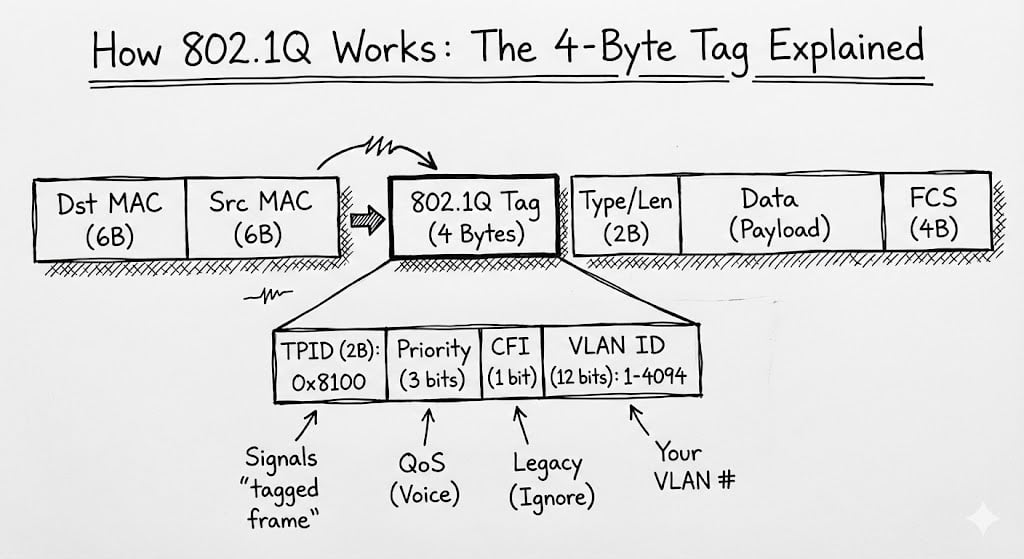
802.1Q tagging makes this work. When a frame needs to cross between switches, it gets a 4-byte tag saying "I belong to VLAN 20." The receiving switch reads the tag and keeps that traffic in VLAN 20.
Why VLANs Matter for CCNA and Real Networks
Without VLANs, every device hears every broadcast frame. ARP requests. DHCP discoveries. Windows NetBIOS chatter. All of it. This kills network performance as you scale.
Security-wise, VLANs are your first line of defense. Printers shouldn't see servers. Guest WiFi shouldn't browse domain controllers. VLANs provide the basic hygiene that prevents most "oops" moments.
Where You'll Use Them:
- Campus networks: Separating User, Voice, and Management traffic.
- Labs and POCs: Creating isolated test environments that don't break production.
- Small businesses: Keeping POS systems safely away from the guest WiFi.
- Training setups: Giving student groups their own distinct sandboxes.
How 802.1Q Actually Works (The 4-Byte Tag Explained)
802.1Q inserts a 4-byte field into the standard Ethernet header:
- TPID (2 bytes): Always 0x8100. This signals to the switch, "Hey, this frame is tagged."
- Priority (3 bits): Used for QoS markings (critical for Voice traffic).
- CFI (1 bit): Mostly for legacy Token Ring compatibility (you can safely ignore this).
- VLAN ID (12 bits): Your actual VLAN number (1-4094).
The Native VLAN is the one special VLAN that crosses trunk links without a tag. By default, this is VLAN 1, a setting that is a known security risk and a common cause of configuration headaches.
VLAN types (data, voice, native, management) and common IDs
Here's a standard deployment model you'll see in the wild:
|
VLAN Type |
Common IDs |
Purpose |
|---|---|---|
|
Data |
10-99 |
User workstations, printers, standard devices. |
|
Voice |
100-199 |
VoIP phones (often tagged separately on the same physical port). |
|
Management |
200-299 |
Switch/Router management interfaces (keep this locked down!). |
|
Guest |
300-399 |
Isolated visitor access |
|
Native |
999 |
An unused VLAN ID for security purposes on trunks. |
Access vs. Trunk Ports: The Rule of Thumb
- Access ports: Carry traffic for a single VLAN, untagged. Use these for end devices (PCs, printers, cameras).
- Trunk ports: Carry traffic for multiple VLANs, using 802.1Q tags. Use these to connect switches together or to connect to routers/firewalls.
Do not configure ports as trunks "just in case." Every unnecessary trunk is a potential security hole or loop vector.
Native VLAN and why to harden it
The native VLAN crosses trunks without tags. If you misconfigure it, traffic leaks between VLANs. I've seen catastrophic failures where Site A (using native VLAN 1) connected to Site B (using native VLAN 10), merging two completely different networks and causing total chaos.
Always set the native VLAN to an unused number (like 999) and ensure it matches perfectly on both ends of the link.
Building VLANs on Cisco Switches
Here's my standard VLAN creation template:
vlan 10
name DATA_USERS
vlan 20
name DATA_SERVERS vlan 100
name VOICE_PHONES
vlan 200
name MGMT_NETWORK
vlan 999
name NATIVE_UNUSED
Pro tip: Always name your VLANs. Troubleshooting "VLAN 10" is harder than troubleshooting "DATA_USERS".
Assigning access ports
Basic access port configuration:
interface GigabitEthernet1/0/1
description User_Workstation
switchport mode access
switchport access vlan 10
spanning-tree portfast
spanning-tree bpduguard enable
Verify it worked:
show vlan brief
show interfaces gi1/0/1 switchport
If the port doesn't show in VLAN 10, check if it's configured as a trunk by mistake. Happens more than you'd think.
Configuring trunks (switchport mode trunk, switchport trunk allowed vlan, pruning)
A secure trunk configuration looks like this:
interface GigabitEthernet1/0/48
description Uplink_to_Distribution
switchport trunk encapsulation dot1q
switchport mode trunk
switchport trunk native vlan 999
switchport trunk allowed vlan 10,20,100,200
switchport nonegotiate
That allowed vlan command is critical. It prevents broadcast storms from flooding across trunks unnecessarily.
Trunk prerequisites and consistency checks
Before your trunk works, verify:
- Both ends are configured as trunk.
- Native VLANs match on both sides.
- The Allowed VLAN lists overlap correctly.
- Encapsulation matches (dot1q).
My go-to validation sequence:
show vlan brief ! VLANs exist?
show interfaces trunk ! Trunks active and allowing correct VLANs?
show mac address-table vlan 10 ! MACs learning in right VLAN?
show spanning-tree vlan 10 ! STP stable?
If all four check out, your VLANs are probably working.
Inter-VLAN Routing: How VLANs Talk to Each Other
Since VLANs isolate Layer 2 domains, routing is required to allow communication between them.
Router-on-a-Stick (RoAS)
RoAS uses one physical interface with multiple logical subinterfaces.
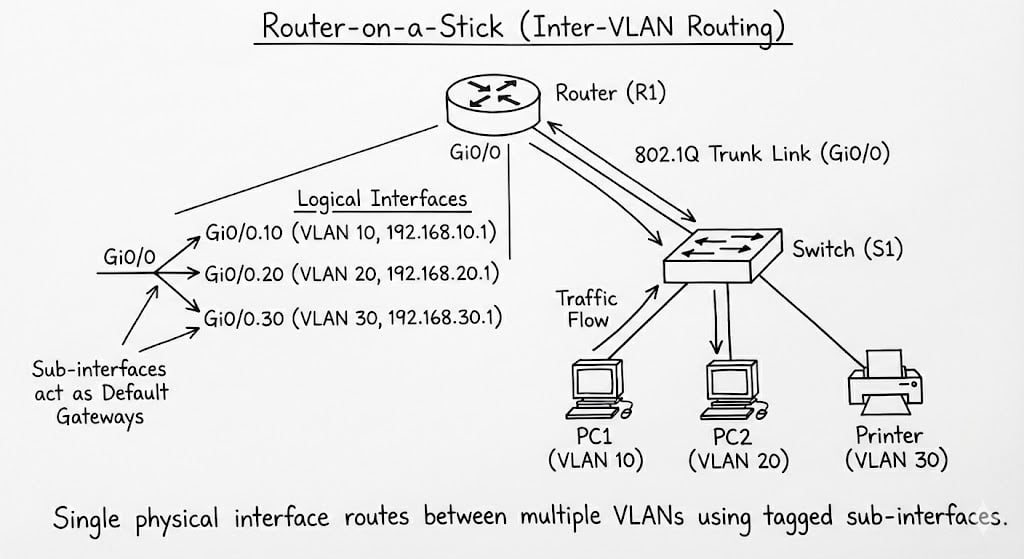
Here's what I type every time I set up RoAS:
Step 1: Router subinterfaces (complete config):
interface GigabitEthernet0/0
no shutdown
no ip address
! interface GigabitEthernet0/0.10
description VLAN_10_Gateway
encapsulation dot1q 10
ip address 192.168.10.1 255.255.255.0
ip helper-address 192.168.200.10 ! DHCP server
! interface GigabitEthernet0/0.20
description VLAN_20_Gateway encapsulation dot1q 20
ip address 192.168.20.1 255.255.255.0
ip helper-address 192.168.200.10
! interface GigabitEthernet0/0.999
description Native_VLAN
encapsulation dot1q 999 native
Step 2: Switch configuration (complete trunk setup):
interface GigabitEthernet1/0/24
description To_Router
switchport trunk encapsulation dot1q
switchport mode trunk
switchport trunk native vlan 999
switchport trunk allowed vlan 10,20,30
switchport nonegotiate
spanning-tree portfast trunk
The DHCP Relay gotcha: DHCP broadcasts don't cross VLANs. Your DHCP server in VLAN 200 can't hear requests from VLAN 10. That's where ip helper-address comes in. It converts broadcasts to unicast. But here's what burned me: it forwards more than just DHCP by default (TFTP, DNS, etc.). Use ip forward-protocol to limit it.
Layer 3 Switch with SVIs
SVIs (Switched Virtual Interfaces) let the switch do routing in hardware. Way faster than RoAS.
! Enable routing
ip routing
! interface Vlan10
description DATA_USERS_GATEWAY
ip address 192.168.10.1 255.255.255.0
ip helper-address 192.168.200.10
no shutdown
! interface Vlan20
description DATA_SERVERS_GATEWAY
ip address 192.168.20.1 255.255.255.0
no shutdown
Once ip routing is enabled and SVIs are up, the switch builds a routing table with connected routes for each VLAN subnet. That's what enables traffic to move between VLANs at wire speed.
Adding Gateway Redundancy with HSRP/VRRP
To avoid a single point of failure, use HSRP (Hot Standby Router Protocol) or VRRP.
HSRP configuration for redundant L3 switches:
! Switch 1 (Primary for VLAN 10)
interface Vlan10
ip address 192.168.10.2 255.255.255.0
standby 10 ip 192.168.10.1 ! Virtual IP (what clients use)
standby 10 priority 110 ! Higher = primary
standby 10 preempt ! Take over when available
standby 10 authentication md5 key-string MySecretKey
standby 10 timers 1 3 ! 1 sec hello, 3 sec dead
! Switch 2 (Backup for VLAN 10) interface Vlan10
ip address 192.168.10.3 255.255.255.0
standby 10 ip 192.168.10.1
standby 10 priority 100 ! Lower = backup
standby 10 authentication md5 key-string MySecretKey
standby 10 timers 1 3
Load-balancing trick: Make different switches primary for different VLANs:
! Switch 1: Primary for VLAN 10 (priority 110), backup for VLAN 20 (priority 100)
! Switch 2: Primary for VLAN 20 (priority 110), backup for VLAN 10 (priority 100)
Clients use 192.168.10.1 as gateway. If Switch 1 dies, Switch 2 takes over in under 3 seconds. Tested this during maintenance. Users never noticed.
Watch out: SVIs go down if no ports are active in that VLAN. Drove me crazy once. VLAN existed, SVI configured, but someone pruned it from all trunks.
When to pick each method
|
Method |
Best For |
Pros |
Cons |
|---|---|---|---|
|
Router-on-a-Stick |
Labs, small offices |
Simple, cheap |
Single point of failure, bandwidth bottleneck |
|
L3 Switch SVIs |
Production, campus |
Wire-speed routing, redundancy options |
More expensive, complex |
I use RoAS for CCNA labs and sub-50 device networks. Everything else gets L3 switches with SVIs.
How Packets Actually Flow in Inter-VLAN Routing
Here's what actually happens when PC1 (VLAN 10, 192.168.10.5) pings PC2 (VLAN 20, 192.168.20.5):
- PC1 checks destination: Is 192.168.20.5 in my subnet? No. Send to gateway.
- PC1 ARPs for gateway: "Who has 192.168.10.1?" (NOT for PC2)
- Frame arrives at switch: Tagged as VLAN 10, forwarded to router/L3 switch
- Router receives frame: Strips VLAN 10 tag, looks at destination IP
- Router routes packet: "192.168.20.5? That's in VLAN 20"
- Router sends frame: Adds VLAN 20 tag, forwards to PC2
I watched this in Wireshark once. Seeing those tags change was my "aha" moment. The router literally rewrites the frame headers.
Verification tip: Run debug ip icmp on your router to watch pings in real-time. Just remember to undebug all when done. Debug commands can crush CPU in production.
ACLs Between VLANs
Want to stop VLAN 30 (guests) from reaching VLAN 20 (servers) but allow internet access?
ip access-list extended DENY_GUEST_TO_SERVERS
deny ip 192.168.30.0 0.0.0.255 192.168.20.0 0.0.0.255
permit ip any any
! interface vlan 30
ip access-group DENY_GUEST_TO_SERVERS in
Test this before production.
DHCP Relay: Why Your Devices Can't Get IPs Across VLANs
DHCP uses broadcasts. VLANs block broadcasts. Problem.
Enter ip helper-address:
interface Vlan10
ip helper-address 192.168.200.10 ! DHCP server in different VLAN
But here's the gotcha. It forwards MORE than DHCP by default:
- TFTP (port 69)
- DNS (port 53)
- Time (port 37)
- NetBIOS (ports 137-138)
- TACACS (port 49)
To forward ONLY DHCP:
no ip forward-protocol udp 69
no ip forward-protocol udp 53
no ip forward-protocol udp 37
no ip forward-protocol udp 137
no ip forward-protocol udp 138
ip forward-protocol udp 67
Learned this when our TFTP server started getting hammered with misdirected packets.
VLAN Security: Layer 2 Hardening
VLANs improve segmentation, but let's be clear. VLANs are not security tools. They're organizational tools. To actually secure Layer 2, you need the following hardening techniques.
Disable DTP
DTP is polite to a fault. It tries to negotiate trunks automatically. But in modern networks, this "helpfulness" creates more accidental trunks than evil hackers ever could.
A device pretending to be a switch can form a trunk and access multiple VLANs.
Fix:
switchport nonegotiate
A port that never negotiates a trunk will never accidentally become one.
Native VLAN Security
Native VLAN handling is one of the most misunderstood and misconfigured parts of VLAN security. It's a common avenue for VLAN hopping attacks.
Mitigations:
- Use an unused VLAN as the native VLAN (e.g., VLAN 999)
- Never use VLAN 1 for anything sensitive
- Ensure the native VLAN is consistent on both sides of a trunk
- Tag the native VLAN, if the platform supports it
Misaligned native VLANs equal traffic leaking into the wrong broadcast domain. It's the Layer 2 equivalent of mixing your laundry whites and colors.
Port Security
This protects access ports from unknown devices, MAC flooding, and unwanted bridging loops.
Basic configuration:
switchport port-security
You can also limit MAC count, use sticky MAC, and set violation actions (protect, restrict, shutdown).
Prevents rogue devices from plugging into your network and causing havoc. Intentional or otherwise.
DHCP Snooping + DAI + IP Source Guard
They work together to prevent spoofing, poisoning, impersonation, and general bad behavior.
DHCP Snooping: Blocks rogue DHCP servers. Builds a binding table of legitimate IP/MAC/VLAN/Port data.
Dynamic ARP Inspection (DAI): Uses the DHCP Snooping bindings to block malicious ARP replies. Prevents ARP spoofing and MITM attempts.
IP Source Guard: Ensures devices only use the IPs assigned to them. Prevents IP spoofing.
These three combined stop the majority of L2 attacks that occur in real networks.
STP Protections
Spanning Tree Protocol keeps your Layer 2 topology loop-free. But STP is only as safe as the configurations protecting it.
PortFast: Allows access ports to transition to forwarding state immediately.
spanning-tree portfast
BPDU Guard: Disables a port if it receives a BPDU. Perfect for preventing accidental switch connections on user ports.
spanning-tree bpduguard enable
Root Guard: Prevents a rogue switch from becoming the STP root.
spanning-tree guard root
STP loops cause broadcast storms, CPU meltdowns, and "the network is down for everyone" emergencies. These protections stop many incidents before they start.
Troubleshooting VLANs
The four horsemen of VLAN failures:
- Wrong VLAN ID: Port in VLAN 100 instead of 10
- Trunk not allowing VLAN: Forgot to add new VLAN to trunk
- No default gateway: PCs can't leave their subnet
- Native VLAN mismatch: Traffic leaking between VLANs
I see #2 constantly. Someone creates VLAN 50, assigns ports, then wonders why it doesn't work. Check the trunk!
Private VLANs
PVLANs create sub-VLANs within a VLAN. Think hotel WiFi. Guests can reach the internet but not each other.
Three types:
- Promiscuous: Can talk to everyone (gateway)
- Isolated: Can only talk to promiscuous (guest rooms)
- Community: Can talk to each other and promiscuous (conference rooms)
Honestly? Most people use ACLs instead. PVLANs are clever but complex. I've only deployed them twice in production.
VTP Warning
VTP can nuke your entire VLAN database in seconds. I've seen it happen. Someone connects a switch with a higher revision number and BAM, all VLANs gone.
Fix: Set VTP mode to transparent or off:
vtp mode transparent
Now you control your VLANs manually. More work, less disasters.
STP interactions with trunks
Trunks carry all VLANs' STP BPDUs. One misconfigured trunk can cause multiple spanning-tree reconvergences.
! On access ports
spanning-tree portfast
spanning-tree bpduguard enable
! On trunks to other switches spanning-tree guard root
! On trunks to non-switches
spanning-tree bpduguard enable
VLAN Pruning: Stop Sending Traffic Where It's Not Needed
Without pruning, ALL VLANs flood across ALL trunks. Even to switches without those VLANs.
Manual pruning:
switchport trunk allowed vlan 10,20,30! Or remove specific VLANs
switchport trunk allowed vlan remove 40-100
I had a client with 50 VLANs crossing every trunk. Only 3 VLANs actually needed at each access switch. Pruning cut broadcast traffic by 90%.
VTP Pruning (automatic but risky):
vtp pruning
I don't use VTP pruning. Too many horror stories about VLANs disappearing when you need them most.
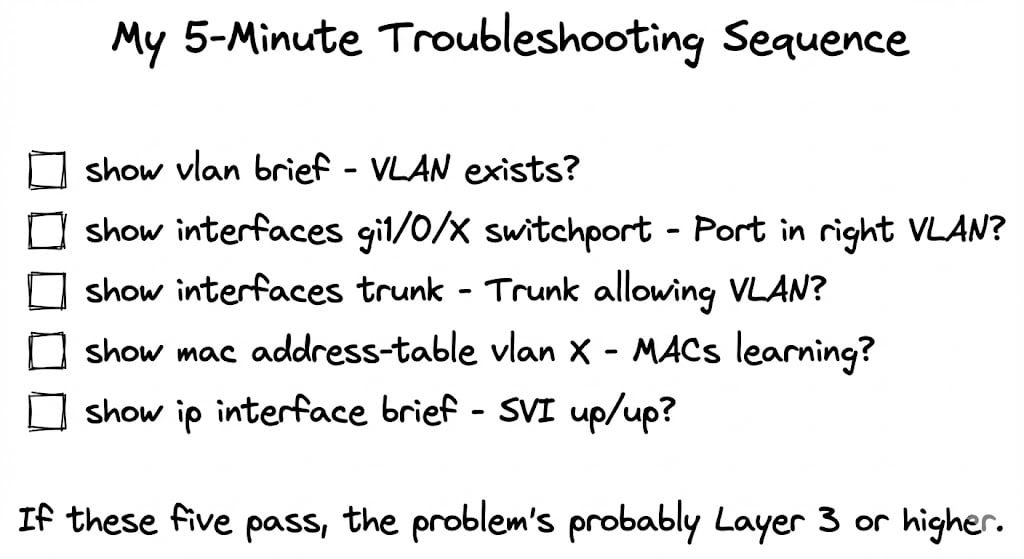
My 5-Minute Troubleshooting Sequence
- show vlan brief - VLAN exists?
- show interfaces gi1/0/X switchport - Port in right VLAN?
- show interfaces trunk - Trunk allowing VLAN?
- show mac address-table vlan X - MACs learning?
- show ip interface brief - SVI up/up?
If these five pass, the problem's probably Layer 3 or higher.
The Complete VLAN Verification Toolkit
My muscle-memory verification sequence:
! Quick health check
show vlan brief ! VLANs exist and ports assigned?
show interfaces status ! Port status and VLAN membership
show interfaces trunk ! Which VLANs crossing trunks?
! Deeper investigation
show interfaces gi1/0/1 switchport ! Full port config
show mac address-table vlan 10 ! MACs learning correctly?
show spanning-tree vlan 10 ! STP converged?
show vlan id 10 ! Detailed VLAN info
! Inter-VLAN routing checks
show ip interface brief | include Vlan ! SVIs up/up?
show ip route ! Routes present?
show ip route 192.168.20.0 ! Specific route lookup
show ip arp ! ARP entries from all VLANs?
show ip arp vlan 10 ! ARP for specific VLAN
! Advanced debugging (use carefully)
debug ip icmp ! Watch pings real-time
debug ip packet ! See routing decisions
undebug all ! ALWAYS turn off debugs!
If something's broken, it's in one of these outputs. Guaranteed.
Broadcast storms and how to avoid them
Broadcast storms happen when loops exist without STP protection. One broadcast becomes millions.
Prevention:
- Enable STP on all VLANs
- Use storm control on access ports
- Prune unnecessary VLANs from trunks
- Enable BPDU guard on user-facing ports
interface range gi1/0/1-47
storm-control broadcast level 1.00
storm-control action trap
Multi-Switch Considerations
In production, your VLANs span multiple switches. The gotchas multiply:
- VLAN must exist on ALL switches in the path
- Trunks must allow it at EVERY hop
- One missing 'allowed vlan' breaks everything
I map this out on paper first. Old school, but it works. Draw your switches, mark your trunks, list allowed VLANs. You'll spot the gap.
Design Notes for Labs and POCs
IP addressing plan per VLAN
My standard VLAN planning template:
|
VLAN ID |
Name |
Subnet |
Gateway |
Purpose |
|---|---|---|---|---|
|
10 |
USERS |
10.1.10.0/24 |
10.1.10.1 |
Workstations |
|
20 |
SERVERS |
10.1.20.0/24 |
10.1.20.1 |
Data center |
|
100 |
VOICE |
10.1.100.0/24 |
10.1.100.1 |
VoIP phones |
|
200 |
MGMT |
10.1.200.0/24 |
10.1.200.1 |
Management |
|
999 |
NATIVE |
— |
— |
Unused |
Leave gaps between VLAN IDs. You'll need them later.
VLAN Assignment by Traffic Type
Voice Traffic (VLANs 100-199): Separate from data for QoS marking. Priority 5 (EF) for RTP streams. Smaller subnets (/25 or /26) usually sufficient. Enable voice VLAN on access ports: switchport voice vlan 100
Data Traffic (VLANs 10-99): Segment by department or floor. Standard /24 subnets work for most. Consider growth. Don't use /28 to save IPs. Apply storm control: storm-control broadcast level 20
Management Traffic (VLANs 200-299): Switches, routers, APs, UPS devices. Strict ACLs. Only admin workstations can access. Out-of-band if possible. Never put on default VLAN 1.
Guest/IoT Traffic (VLANs 300-499): Complete isolation from production. Internet-only access (ACL everything else). Consider per-building or per-SSID VLANs. Rate-limit at switch: srr-queue bandwidth limit 10
Document everything. I maintain a spreadsheet with VLAN ID, name, subnet, gateway, switch ports, and purpose. Saved me countless hours.
Small-business vs campus lab topology guidance
Small business (under 100 devices):
- 2-3 VLANs max
- Single L3 switch or RoAS
- Simple topology, easy troubleshooting
Campus (1000+ devices):
- VLANs per building/floor
- Collapsed core with L3 switches
- HSRP/VRRP for redundancy
- Strict VLAN pruning
Practice Inter-VLAN Routing in a Lab
Reading about VLANs is one thing. Watching a trunk silently drop traffic because you forgot to add VLAN 20 to the allowed list is another. The concepts here only stick when you've broken them yourself.
A basic VLAN lab needs two switches, one router or L3 switch, and a couple of endpoints. Start with RoAS (it's simpler to set up), then rebuild the same topology using SVIs. Once both methods work, introduce HSRP and test failover by shutting down the primary switch.
You can build this in GNS3 or EVE-NG locally, or use a cloud-based lab if your laptop doesn't have the resources for multiple switch images. CloudMyLab's hosted environments come with Cisco switch and router images ready to go, with snapshot and rollback so you can reset to a clean baseline after each scenario.
What's next?
Dynamic VLANs with 802.1X
Instead of static port assignments, RADIUS assigns VLANs based on credentials.
How it works:
- User connects to port
- Switch asks for credentials (802.1X)
- RADIUS server authenticates
- RADIUS says "put them in VLAN 10"
- Switch dynamically assigns port to VLAN 10
interface gi1/0/1 authentication port-control auto
dot1x pae authenticator
authentication host-mode multi-auth
Complex to set up, magical when working. Users move desks? No problem. VLAN follows them.
SDN Controllers and VLANs
Modern SDN (Cisco DNA Center, Arista CloudVision) treats VLANs as abstract segments. You say "create isolation between departments" and the controller handles VLANs automatically. No more manual configuration across 50 switches.
Still need to understand VLANs when SDN breaks though. Trust me. Automation fails at the worst times.
VXLAN vs Traditional VLANs
VXLAN extends Layer 2 across Layer 3 networks. Think of it as VLANs on steroids:
- 16 million segments (vs 4094 VLANs)
- Works across data centers
- Encapsulates entire Ethernet frame in UDP
When to use VXLAN:
- Multi-site data centers
- Cloud provider networks
- When you've exhausted 4094 VLANs (rare)
For 99% of networks, regular VLANs are still the answer.
VLANs and inter-VLAN routing form the backbone of modern network segmentation. Whether you're building your first lab or troubleshooting a campus network with 200 VLANs, the principles stay the same: segment carefully, route deliberately, and test everything before it hits production.
FAQs
What's the difference between a VLAN and a subnet?
VLAN equals Layer 2 broadcast domain. Subnet equals Layer 3 IP range. They usually map 1:1 (VLAN 10 uses 10.1.10.0/24), but not always. I've seen multiple subnets in one VLAN. It works but complicates troubleshooting.
When should I use router-on-a-stick vs SVIs on a Layer 3 switch?
RoAS for labs and networks under 50 devices. L3 switches with SVIs for everything else. The performance difference is dramatic. Software routing vs. hardware ASICs.
Why can hosts in different VLANs not reach each other after I configured trunks?
Trunks just carry VLANs between switches. You need routing (RoAS or SVIs) for inter-VLAN communication. No router equals no routing between VLANs.
What is the native VLAN and how do I secure it?
The native VLAN crosses trunks without 802.1Q tags. Secure it by: setting to unused VLAN (999), matching on both ends, never putting devices in it.
Can I use DHCP across VLANs?
Yes, with ip helper-address on your routing device. It converts DHCP broadcasts to unicast and forwards them to your DHCP server. Just remember it forwards more than DHCP by default. Configure ip forward-protocol to limit it.
